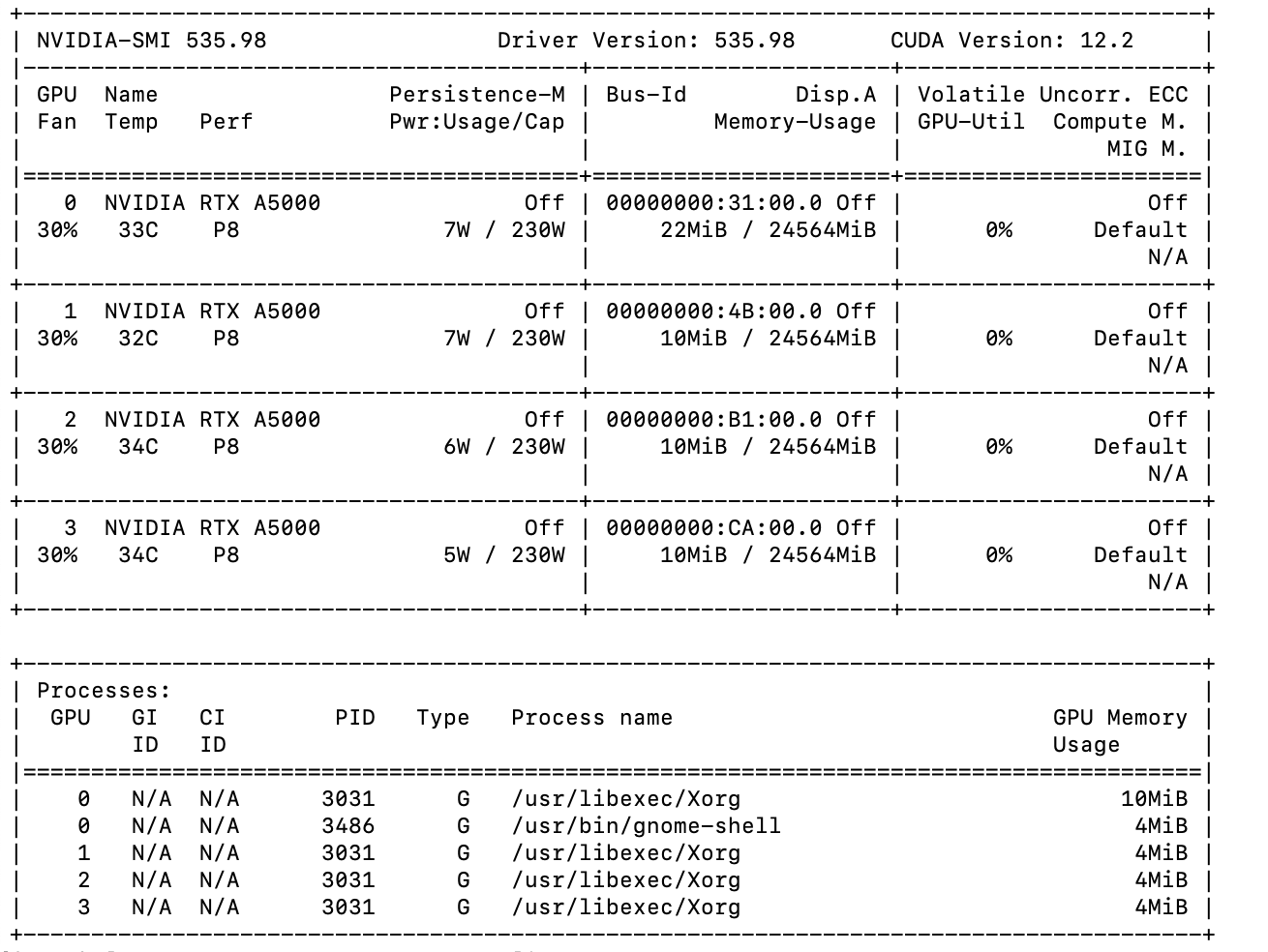
Sorry to have to post this here, but I am at my wit’s end with this error. I have been having issues with permissions in the server regarding integral files like sudo. This caused me to have a nightmare of a time sorting out the issues. CryoSparc instances update fine. I tested this error with newer and older versions of CryoSparc to no success. Jobs like Select 2D work fine. This error was encountered during a 2D Classification. Any insight into this issue would be amazing.
Thank you and best,
B
[2025-07-09 14:58:48.49]
Traceback (most recent call last):
File “/home/cryosparc_user/software/cryosparc/cryosparc_worker/deps/anaconda/envs/cryosparc_worker_env/lib/python3.10/site-packages/numba/cuda/cudadrv/driver.py”, line 254, in ensure_initialized
self.cuInit(0)
File “/home/cryosparc_user/software/cryosparc/cryosparc_worker/deps/anaconda/envs/cryosparc_worker_env/lib/python3.10/site-packages/numba/cuda/cudadrv/driver.py”, line 348, in safe_cuda_api_call
return self._check_cuda_python_error(fname, libfn(*args))
File “/home/cryosparc_user/software/cryosparc/cryosparc_worker/deps/anaconda/envs/cryosparc_worker_env/lib/python3.10/site-packages/numba/cuda/cudadrv/driver.py”, line 408, in _check_cuda_python_error
raise CudaAPIError(retcode, msg)
numba.cuda.cudadrv.driver.CudaAPIError: [CUresult.CUDA_ERROR_UNKNOWN] Call to cuInit results in CUDA_ERROR_UNKNOWN
During handling of the above exception, another exception occurred:
Traceback (most recent call last):
File “cryosparc_master/cryosparc_compute/run.py”, line 116, in cryosparc_master.cryosparc_compute.run.main
File “cryosparc_master/cryosparc_compute/jobs/class2D/newrun.py”, line 291, in cryosparc_master.cryosparc_compute.jobs.class2D.newrun.run_class_2D
File “cryosparc_master/cryosparc_compute/jobs/class2D/newrun.py”, line 562, in cryosparc_master.cryosparc_compute.jobs.class2D.newrun.class2D_engine_run
File “cryosparc_master/cryosparc_compute/gpu/gpucore.py”, line 48, in cryosparc_master.cryosparc_compute.gpu.gpucore.initialize
File “/home/cryosparc_user/software/cryosparc/cryosparc_worker/deps/anaconda/envs/cryosparc_worker_env/lib/python3.10/site-packages/numba/cuda/cudadrv/driver.py”, line 3216, in get_version
return driver.get_version()
File “/home/cryosparc_user/software/cryosparc/cryosparc_worker/deps/anaconda/envs/cryosparc_worker_env/lib/python3.10/site-packages/numba/cuda/cudadrv/driver.py”, line 461, in get_version
version = driver.cuDriverGetVersion()
File “/home/cryosparc_user/software/cryosparc/cryosparc_worker/deps/anaconda/envs/cryosparc_worker_env/lib/python3.10/site-packages/numba/cuda/cudadrv/driver.py”, line 292, in getattr
self.ensure_initialized()
File “/home/cryosparc_user/software/cryosparc/cryosparc_worker/deps/anaconda/envs/cryosparc_worker_env/lib/python3.10/site-packages/numba/cuda/cudadrv/driver.py”, line 258, in ensure_initialized
raise CudaSupportError(f"Error at driver init: {description}")
numba.cuda.cudadrv.error.CudaSupportError: Error at driver init: Call to cuInit results in CUDA_ERROR_UNKNOWN (999)
The first Error that appears, in “line 408”, indicates an issue within the numba.cuda.cudadrv.driver module, possibly due to incorrect memory access or invalid pointers within the CUDA kernel or related functions_
A cuda-12.2 driver should be compatible with recent CryoSPARC releases up to v4.7.1 that bundle cuda-11.8 libraries, but not with CryoSPARC v4.7.1-cuda12.
This could be relevant here. Please can you try if adding the line
Thanks @bqpham For posting the nvidia-smi output.
Please can you post the outputs of these commands in a fresh shell on the computer:
/home/cryosparc_user/software/cryosparc/cryosparc_worker/bin/cryosparcw call env | grep PATH
# install and activate a temporary python environment
cd $(mktemp -d)
/home/cryosparc_user/software/cryosparc/cryosparc_worker/bin/cryosparcw call python -m venv $(pwd)/cudatest
. cudatest/bin/activate
pip install cuda-python~=11.8.0
# paste and run this multiline command
python <<EOF
try:
    # Try to import the CUDA driver API
    from cuda.bindings import driver as cuda

    # Try to initialize CUDA
    result = cuda.cuInit(0)[0]

    if result == cuda.CUresult.CUDA_SUCCESS:
        print("CUDA initialized successfully!")
        device_count = cuda.cuDeviceGetCount()[1]
        print(f"Found {device_count} CUDA device(s)")
    else:
        print(f"CUDA initialization failed with error code: {result}")

except ImportError:
    print("Failed to import CUDA libraries. Make sure they are installed and in your PYTHONPATH.")
except Exception as e:
    print(f"Error during CUDA initialization: {e}")
EOF
# record the output, then exit the shell
exit
@wtempel thank you for the response. Sorry for the late response, I had to push this down in my priorities for a second. Here is the output:
Finding driver from candidates:
        libcuda.so
        libcuda.so.1
        /usr/lib/libcuda.so
        /usr/lib/libcuda.so.1
        /usr/lib64/libcuda.so
        /usr/lib64/libcuda.so.1
Using loader <class 'ctypes.CDLL'>
        Trying to load driver...        ok
                Loaded from libcuda.so
        Mapped libcuda.so paths:
                /usr/lib64/libcuda.so.535.98
Finding nvvm from Conda environment (NVIDIA package)
        Located at /home/cryosparc_user/software/cryosparc/cryosparc_worker/deps/anaconda/envs/cryosparc_worker_env/nvvm/lib64/libnvvm.so.4.0.0
        Trying to open library...       ok
Finding nvrtc from Conda environment (NVIDIA package)
        Located at /home/cryosparc_user/software/cryosparc/cryosparc_worker/deps/anaconda/envs/cryosparc_worker_env/lib/libnvrtc.so.11.8.89
        Trying to open library...       ok
Finding cudart from Conda environment (NVIDIA package)
        Located at /home/cryosparc_user/software/cryosparc/cryosparc_worker/deps/anaconda/envs/cryosparc_worker_env/lib/libcudart.so.11.8.89
        Trying to open library...       ok
Finding cudadevrt from Conda environment (NVIDIA package)
        Located at libcudadevrt.a
        Checking library...     ERROR: failed to find cudadevrt:
libcudadevrt.a not found
Finding libdevice from Conda environment (NVIDIA package)
        Located at /home/cryosparc_user/software/cryosparc/cryosparc_worker/deps/anaconda/envs/cryosparc_worker_env/nvvm/libdevice/libdevice.10.bc
        Checking library...     ok