V4.7.1-cuda12 does not detect multiple SXM GPUs by default

A bug I’ve found with v4.7.1-cuda12 is that by default it won’t use all SXM GPUs, even when selecting “Use all GPUs.” It uses one by default. You need to disable the “All GPUs” slider and manually specify using 8.

The install process detects all 8, but the web ui forces you to always specify 8. PCIe cards aren’t having the same issue. It’s specifically affecting DGX and HGX nodes with SXM cards.

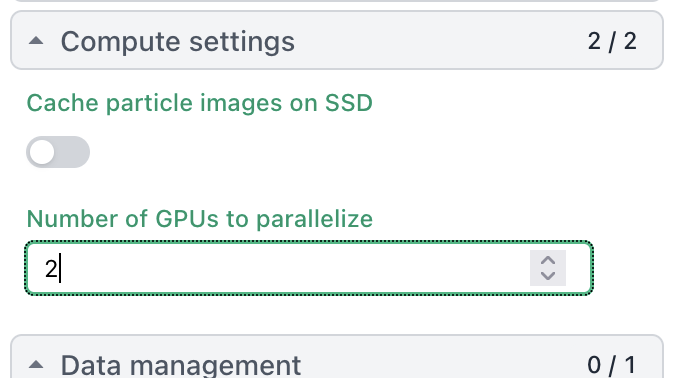
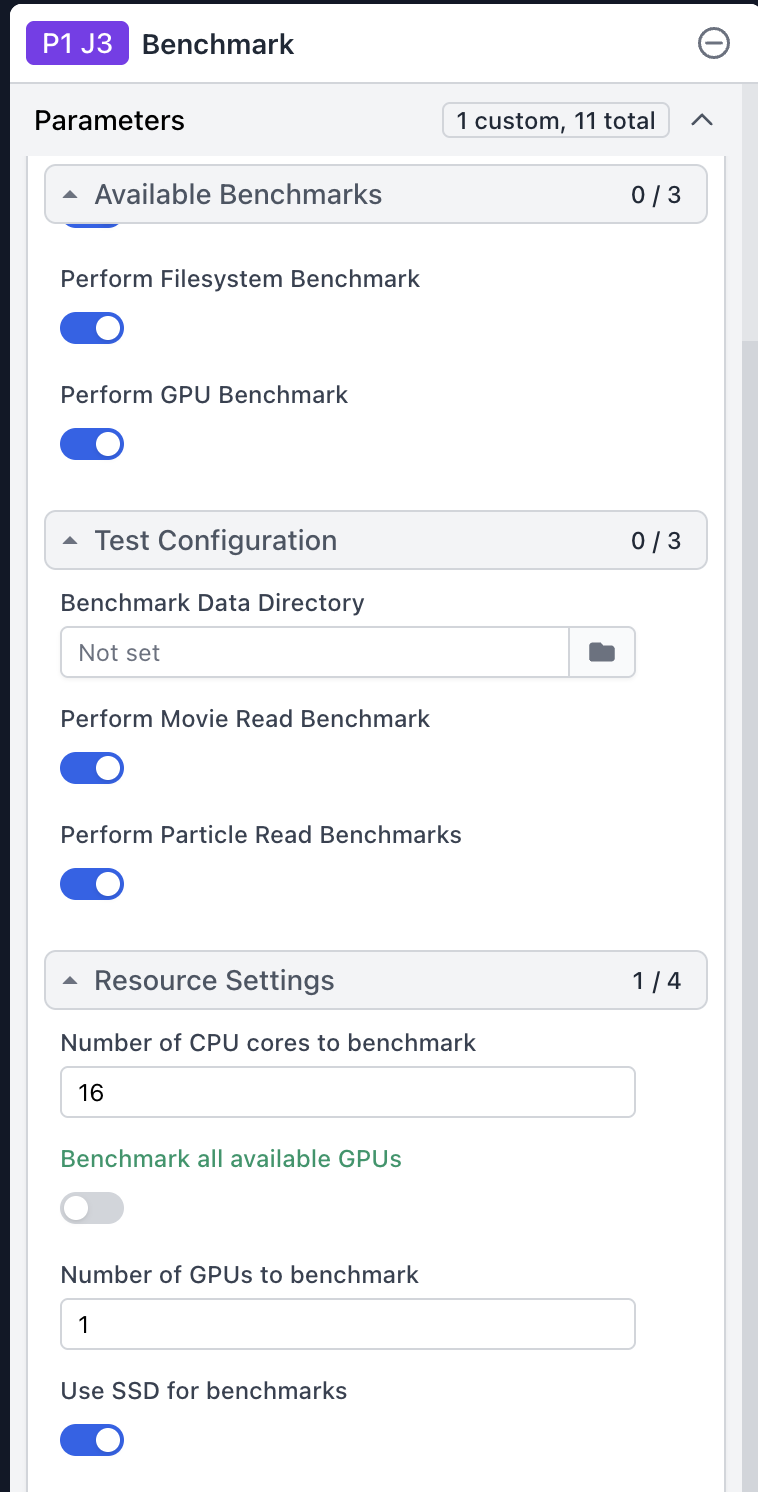
Thanks @UCBKurt for reporting this observation. Please can you post screenshots that
show

  1. where one should

as well as the larger UI context (job builder?) of these controls.

On the benchmark test, if you select “Benchmark all available GPUs”, it always uses only a single GPU. However, if you manually specify, it will use all 8.

Hi @UCBKurt, could you run the following command on the worker machine where you are seeing this?

nvidia-smi --query-gpu=name,pci.bus_id --format=csv

And post the output.

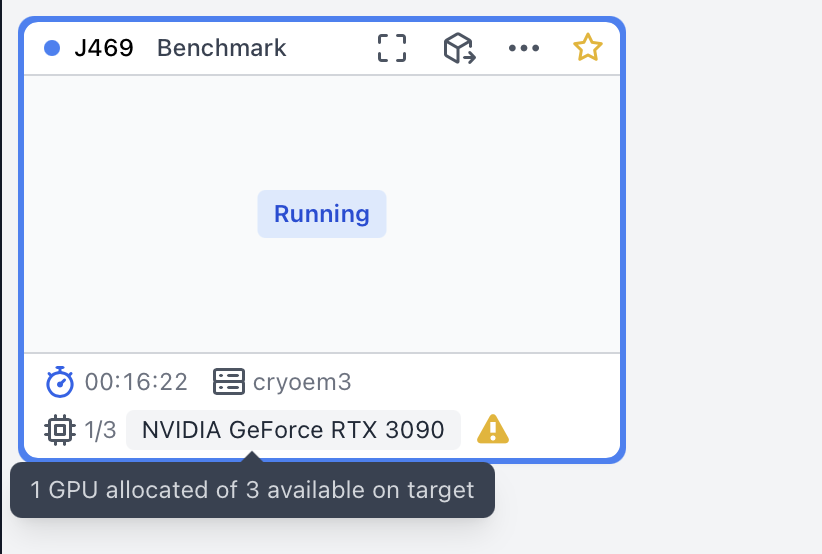
One thing to note is that when “Benchmark all available GPUs” is enabled, CryoSPARC only shows one GPU allocated in the job card, even though the job is actually benching all of them. For example, this job has all GPUs enabled:

The job’s event log should show that all GPUs are getting benchmarked. This discrepancy is a limitation of the current system. Could you verify whether the job’s event log only shows one GPU as well?

Hi @nfrasser,

You’re right, it does actually benchmark every GPU. Is there any info on when we can see the UI fixed?

Another somewhat-related issue though is that when it moves on to a different GPU, it doesn’t release the old one. CryoSPARC hangs on to the previously benchmarked card until all 8 are done. Wouldn’t it make more sense to reserve all 8 from the start then (since we’re hanging on to the unused GPUs until the end)?

Thanks for confirming!

Please can you provide details of the use case where you found the current implementation limiting?

For Benchmark jobs of both an affected node and an unaffected node, please can you post each of the following:

  1. output of the following command on the GPU node
  2. a screenshot of the job’s appearance in the UI
  3. output of the commands (on the CryoSPARC master host)
    csprojectid=P99 # replace with actual project ID
    csjobid=J199 # replace with actual job ID
    cryosparcm cli "get_job('$csprojectid', '$csjobid', 'job_type', 'version', 'status',  'params_spec')"
    

Please can you provide details of the use case where you found the current implementation limiting?

In scenarios where organizations aren’t using a cluster system, if CryoSPARC starts an 8 GPU job, but doesn’t reserve all 8 GPUs at one time, another application (like Relion or alphafold) would see those other GPUs being free. This would result in a conflict once CryoSPARC tries to use the GPU another application is using.

I no longer have access to that specific CryoSPARC instance (as that was only for troubleshooting), but here is the output of nvidia-smi:

name, pci.bus_id
NVIDIA H100 80GB HBM3, 00000000:1B:00.0
NVIDIA H100 80GB HBM3, 00000000:43:00.0
NVIDIA H100 80GB HBM3, 00000000:52:00.0
NVIDIA H100 80GB HBM3, 00000000:61:00.0
NVIDIA H100 80GB HBM3, 00000000:9D:00.0
NVIDIA H100 80GB HBM3, 00000000:C3:00.0
NVIDIA H100 80GB HBM3, 00000000:D1:00.0
NVIDIA H100 80GB HBM3, 00000000:DF:00.0

Kurt

This is possibly related, but I’m not sure. I’m running Ubuntu 25.04 with 2 GPUs in the workstation. cryoSPARC clearly sees both GPUs as it says 1/2 NVIDIA GeForce RTX 5090 at the bottom of the screen and I can see both if I go to select one or the other. I’ve tried running a number of jobs with both GPUs but the jobs only ever run with one GPU. I also have installed the v4.7.1-cuda12 patch update from November 2025. Is there some setting I have missed that will allow me to run jobs with both GPUs?

Best, Tom

@tom Please can you post the output of the following command, where you should replace P99, J199 with relevant project and job IDs, respectively:

cryosparcm cli "get_job('P99', 'J199', 'job_type', 'version', 'params_spec', 'instance_information', 'resources_allocated.slots')"

Sure thing-

{‘_id’: ‘696e8ae5b65b7d40dda7edb6’, ‘instance_information’: {‘CUDA_version’: ‘12.8’, ‘available_memory’: ‘114.58GB’, ‘cpu_model’: ‘AMD Ryzen Threadripper 9960X 24-Cores’, ‘driver_version’: ‘13.0’, ‘gpu_info’: [{‘id’: 0, ‘mem’: 33645461504, ‘name’: ‘NVIDIA GeForce RTX 5090’, ‘pcie’: ‘0000:21:00’}, {‘id’: 1, ‘mem’: 33668988928, ‘name’: ‘NVIDIA GeForce RTX 5090’, ‘pcie’: ‘0000:c1:00’}], ‘ofd_hard_limit’: 1073741816, ‘ofd_soft_limit’: 1024, ‘physical_cores’: 24, ‘platform_architecture’: ‘x86_64’, ‘platform_node’: ‘tom-TRX50-AI-TOP’, ‘platform_release’: ‘6.14.0-37-generic’, ‘platform_version’: ‘#37-Ubuntu SMP PREEMPT_DYNAMIC Fri Nov 14 22:10:32 UTC 2025’, ‘total_memory’: ‘122.88GB’, ‘used_memory’: ‘8.44GB’}, ‘job_type’: ‘class_2D_new’, ‘params_spec’: {‘class2D_K’: {‘value’: 200}, ‘class2D_max_res’: {‘value’: 2.5}, ‘class2D_num_full_iter’: {‘value’: 5}, ‘class2D_num_full_iter_batch’: {‘value’: 100}, ‘class2D_num_full_iter_batchsize_per_class’: {‘value’: 500}, ‘class2D_sigma_init_factor’: {‘value’: 1}, ‘class2D_window_inner_A’: {‘value’: 110}, ‘compute_use_ssd’: {‘value’: False}}, ‘project_uid’: ‘P1’, ‘resources_allocated’: {‘slots’: {‘CPU’: [0, 1, 2, 3], ‘GPU’: [0], ‘RAM’: [0, 1, 2]}}, ‘uid’: ‘J12’, ‘version’: ‘v4.7.1-cuda12+251124’}

Thanks @tom . Please can you confirm that you specified a number for the Number of GPUs to parallelize parameter in the Compute settings section.

Yep, I did (actually with several jobs and they all used just the one GPU). But this never shows up in the Input and Parameters section under Compute Settings- I’m guessing the default is one GPU and what I put in (either typing or using the gui) doesn’t take.

Interesting. Please can you post the output of the command

cryosparcm cli "get_scheduler_targets()"

[{‘cache_path’: ‘/home/tom/scratch/’, ‘cache_quota_mb’: None, ‘cache_reserve_mb’: 10000, ‘desc’: None, ‘gpus’: [{‘id’: 0, ‘mem’: 33645461504, ‘name’: ‘NVIDIA GeForce RTX 5090’}, {‘id’: 1, ‘mem’: 33668988928, ‘name’: ‘NVIDIA GeForce RTX 5090’}], ‘hostname’: ‘tom-TRX50-AI-TOP’, ‘lane’: ‘default’, ‘monitor_port’: None, ‘name’: ‘tom-TRX50-AI-TOP’, ‘resource_fixed’: {‘SSD’: True}, ‘resource_slots’: {‘CPU’: [0, 1, 2, 3, 4, 5, 6, 7, 8, 9, 10, 11, 12, 13, 14, 15, 16, 17, 18, 19, 20, 21, 22, 23, 24, 25, 26, 27, 28, 29, 30, 31, 32, 33, 34, 35, 36, 37, 38, 39, 40, 41, 42, 43, 44, 45, 46, 47], ‘GPU’: [0, 1], ‘RAM’: [0, 1, 2, 3, 4, 5, 6, 7, 8, 9, 10, 11, 12, 13, 14, 15]}, ‘ssh_str’: ‘tom@tom-TRX50-AI-TOP’, ‘title’: ‘Worker node tom-TRX50-AI-TOP’, ‘type’: ‘node’, ‘worker_bin_path’: ‘/home/tom/bin/cryosparc_worker/bin/cryosparcw’}]
Thanks @tom . What broser version (brand, version number, OS in which browser is running) do you use?

Currently going with Firefox: 146.0.1 (64 bit), Mozilla Firefox Snap for Ubuntu, canonical-002-1.0

OS is Ubuntu 25.04

Thanks @tom .
When the 2D classification job is in the building state, are you able to place the mouse cursor int the Number of GPUs to parallelize field, change the number and and press the return key?

I can try that, but I’m in the midst of a long job at the moment and don’t want to kill it at this point.

I’ll give that a go once the job finishes. Thanks for the quick responses and help!

While I am not the OP, I was experiencing a similar issue using the same v4.7.1-cuda12 version of CryoSPARC. I can confirm that “placing the mouse cursor int the Number of GPUs to parallelize field, change the number and and press the return key” worked to allocate 2 GPUs, when previously only 1 of 2 GPUs were allocated.

In my experience the “number of GPUs to parallelize” field had already defaulted to 2, but only 1 was actually allocated when the job was queued. After manually changing this field to 2, 2 GPUs are now being allocated successfully.

Welcome to forum @davidecarlson .

Did you observe this default of 2 on a newly created job, on the clone of an existing job, or a existing job after clearing?