Symmetry expansion subset selection

I have generated a symmetry-expanded set from a D3-symmetric protein complex. Then, after a series of classifications for a binding partner, I back-mapped the binding-partner-containing asymmetric units to the original structure to define a set of 16 structurally distinct D3 states.

Currently, I have lists of UIDs and specific idx values for the symmetry expanded particles in a .csv format. I would like to use the original symmetry expanded particle set to make a cryoSPARC-ready .cs file that contains only the particles with the UIDs and idx values listed in my .csv file—i.e., copy and paste the particle information for the subset of particles listed in the .csv file into a new .cs file so that I can then upload it into Cryosparc for further processing.

I am assuming Cryosparc tools would be the most direct way to do this, but I am not sure how to implement it. What would be the best way to do this?

Thank you!
2 Likes

Hi @dshin! I think you’re probably right that cryosparc-tools is the way to go here, but I’m not sure I understand exactly what you’re aiming to do. I’ve written out what I think you’re trying to do below – could you let me know if that’s right?

  • You have N particles which have D3 symmetry – I’ll call these real particles.
  • You performed symmetry expansion, so you now have 6N “particles” – I’ll call these symmetry particles.**
  • You performed classification on single ASUs of the target, finding 16 distinct sets.
  • For each of the 16 sets, you have a list of particle UIDs and indexes
  • You’d like a way to produce 16 distinct particle datasets, one for each state.

If I have that right, I have a few questions:

  1. Are the states unique particles, or unique views. Put another way – are any of the states related by some rotation/translation, so each symmetry particle is only in one class, but a single real particle may be in more than one class?
  2. How did you generate the list of UIDs and indexes?
  3. Will the 16 distinct particle datasets be real particles (i.e., each one is a unique image extracted from the micrograph), or will they be symmetry particles (i.e., each one is one of 6 rotated copies of a unique image from the micrograph).
2 Likes

Hi @rwaldo, thank you for your reply!

Yes, what you have written out in bullet points is what I am trying to do.

1. These states are unique particles, not views. These are separated by the # of bound partners (there are 6 binding sites total in my D3 particle) and the pattern of occupied sites. The 16 states are structurally unique in both # bound and binding pattern. For example, a 2-bound state with each subunit bound to the top and bottom of a D3 molecule is distinct and unique from a 2-bound state with both subunits bound to the top or bottom.

Perhaps I can provide some details to better describe the process:

(continued on subsequent replies due to word limit, 1/4)

1 Like

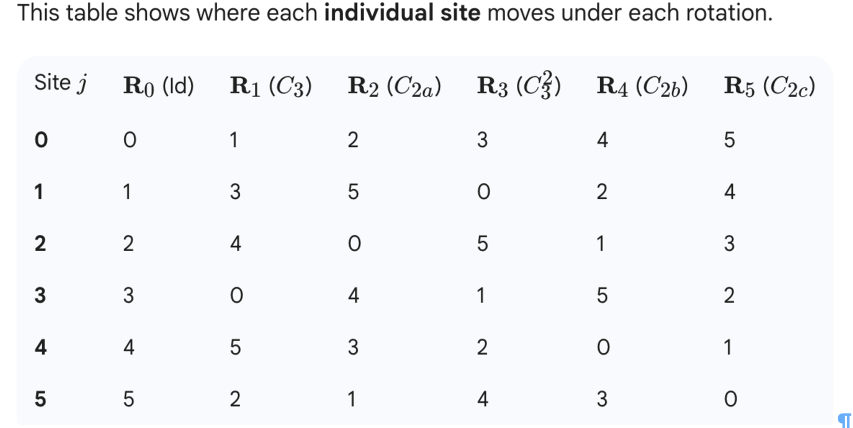
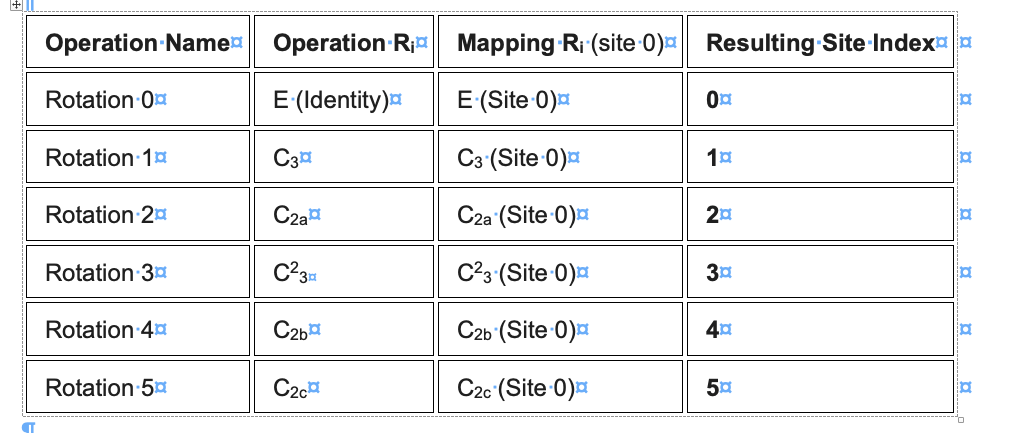
I first used ChatGPT/Gemini to figure out how the 3D poses of a set of symmetry particles were related to one another. This allowed us to figure out the symmetry relationships of each asymmetrical subunit in a D3 molecule based on Cryosparc’s idx notation:

(2/4)

1 Like

…and their relative relationships with each other for every possible 6 sets of symmetry operations in a D3 point group:

(3/4)

1 Like

For example, one of the 16 states is a protein with 3 asymmetrical subunits bound to the binding partner, which will appear in the substrate-bound class as particle repeats with idx numbers of (0,1,2), (1,3,4), (2,5,0), (3,0,5), (4,2,1), or (5,4,3). These 6 binding modes are structurally identical, just rotated by one of the D3 point group symmetry operations (e.g., set (1,3,4) is identical to (0,1,2) by a C3 rotation, which corresponds to the pose information with idx #1).

We want to copy the particle information for a specific idx number in the full symmetry-expanded particle set into a new .cs file that would contain all “(0,1,2)” state particles. We reason that by selecting the specific idx #, we should be able to avoid having to globally re-align the particles in cryoSPARC for further processing.

2. I created the list of UIDs and indexes by the following method:

a. I first downloaded the exported .cs file for a Cryosparc 3D classification job of the asymmetrical subunit, with the mask around the binding site. I converted this .cs file into a .csv file using Cryosparc-tools.

b. Based on the same real particle UID and indexes that were present in the 3D classification job with a class of interest, identify which of the 16 states the real particle belonged to. This allowed us to separate out particles in a 3D classification job based on the # bound (total # of idx present for a real particle) and the substrate binding position (based on the sequence of the idx that were present in our 3D class of interest).

3. The 16 distinct particle datasets will be for real particles (but more specifically, one copy for each real particle selected from the symmetry-expanded particle set, so it doesn’t require additional global alignment).

(4/4)

1 Like

Awesome, thanks for all that information @dshin, that’s very helpful.

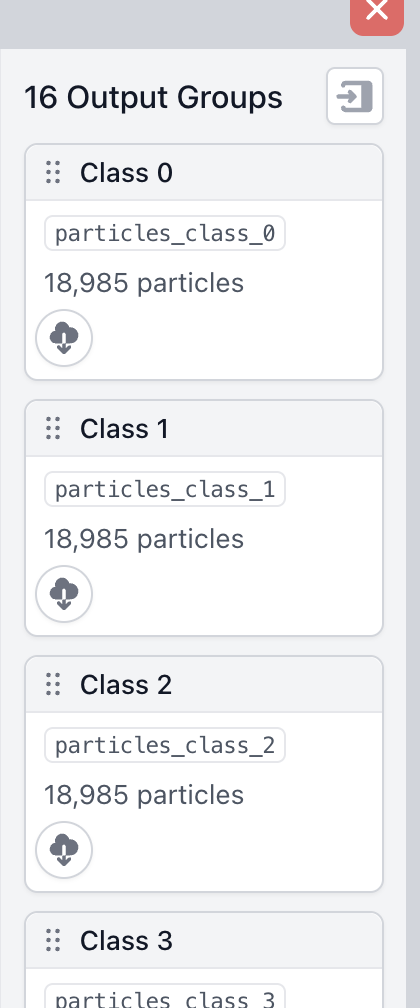
You can use the query method to select particles from a Dataset. Without knowing the format of your CSV I can’t give you a full script, but assuming you have a way to get a list of UIDs per class, I would do something like the script below. This will create an External Job with 16 particles outputs, one for each of your particle classes:

I hope that’s helpful – let me know if you need any help running the script, or if the results don’t look right!

-Rich

from cryosparc.tools import CryoSPARC
import json
import numpy as np
from pathlib import Path
import matplotlib.pyplot as plt

with open(Path("~/instance-credentials/dev2-info.json").expanduser(), "r") as f:
    instance_info = json.load(f)

cs = CryoSPARC(**instance_info)
assert cs.test_connection()

project_uid = "P10"
# This should be a job with all of the particles in it.
job_uid = "J81"
# Whatever the name of the particles output is. Usually just "particles"
particles_title = "particles"

project = cs.find_project(project_uid)
job = project.find_job(job_uid)
workspace_uid = job.doc["workspace_uids"][0]
particles = job.load_output(particles_title)

# you would get 16 lists from your CSV file, one for each class of particle
# the important thing is that this is a list with 16 elements, each of which is
# a list of particle UIDs.
uid_lists = np.array_split(particles["uid"], 16)

ext_job = project.create_external_job(
    workspace_uid,
    "Filtered particles"
)
ext_job.add_input(
    type="particle",
    name="input_particles",
)
ext_job.connect(
    "input_particles",
    job_uid,
    particles_title
)
all_slots = particles.prefixes()
for class_idx in range(len(uid_lists)):
        ext_job.add_output(
            type="particle",
            name=f"particles_class_{class_idx}",
            slots=all_slots,
            title=f"Class {class_idx}"
        )

with ext_job.run():
    for i, uids in enumerate(uid_lists):
        particles_subset = particles.query({"uid": uids})
        ext_job.save_output(
            name=f"particles_class_{i}",
            dataset=particles_subset
        )
3 Likes

Hi Rich,

Thank you so much for this! May I get some help in prepping my reference .csv file, as well as additional pointers for running this script?

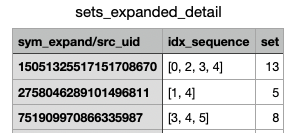
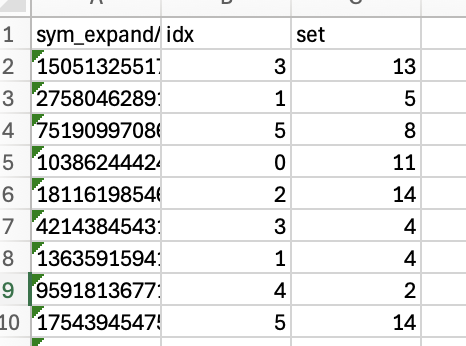
1. My current reference .csv file looks similar to this—a series of src_uids with idx numbers (the image has idx_sequence, which will be replaced with a desired idx number). With this format, how can I modify the .csv to better match Cryosparc tools’ expectations and your script? Also, would the 16 different sets be in different columns within the same .csv file?

2. Where in the CS project folder should the .csv file be?

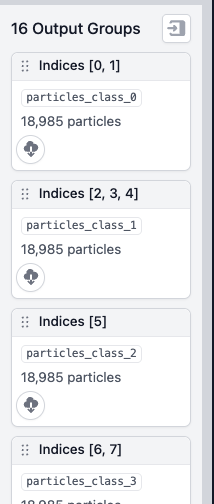
Hi @dshin, to answer your second question first, your CSV file can be anywhere on the system, you’ll provide a path to it in the script. Here’s a new version of the script which takes your CSV’s format into account. You’ll need to install pandas into your cs-tools environment if you haven’t already. It also changes the particle outputs’ titles to match their idx_sequence:

from cryosparc.tools import CryoSPARC
import json
from pathlib import Path
import pandas as pd

with open(Path("~/instance-info.json").expanduser(), "r") as f:
    instance_info = json.load(f)

cs = CryoSPARC(**instance_info)
assert cs.test_connection()

project_uid = "P10"
# This should be a job with all of the particles in it.
job_uid = "J81"
# Whatever the name of the particles output is. Usually just "particles"
particles_title = "particles"

project = cs.find_project(project_uid)
job = project.find_job(job_uid)
workspace_uid = job.doc["workspace_uids"][0]
particles = job.load_output(particles_title)

# path to your csv
df = pd.read_csv("~/symexp_example.csv")
seq_by_set = {
    s: pd.unique(df[df["set"] == s]["idx_sequence"])[0]
    for s in pd.unique(df["set"])
}

ext_job = project.create_external_job(
    workspace_uid,
    "Filtered particles"
)
ext_job.add_input(
    type="particle",
    name="input_particles",
)
ext_job.connect(
    "input_particles",
    job_uid,
    particles_title
)
all_slots = particles.prefixes()
for set_idx, idx_seq in seq_by_set.items():
        ext_job.add_output(
            type="particle",
            name=f"particles_class_{set_idx}",
            slots=all_slots,
            title=f"Indices {idx_seq}"
        )

with ext_job.run():
    for set_idx in seq_by_set.keys():
        uids = df[df["set"] == set_idx]["sym_expand/src_uid"]
        particles_subset = particles.query({"uid": uids})
        ext_job.save_output(
            name=f"particles_class_{set_idx}",
            dataset=particles_subset
        )
2 Likes

Hi Rich,

Thank you so much for the script, I really appreciate it! The correct number of particles is being sorted into groups (sets).

However, when looking at the sorted particle outputs, the sym_expand/idx is all 0.

Screenshot 2025-12-10 at 4.20.06 PM

I would like the particle information for a specific sym_expand/idx for each particle, based on a reference.csv that is now organized as follows:

For example, if particle 1234 was assigned an idx of 4 in set 3 from reference.csv, I want the particle information for 1234 with sym_expand/idx of 4 assigned to set 3. Now, the code sorts the particle 1234 into set 3, but the information is from the particle 1234 with sym_expand/idx of 0.

Is there a way to refine the query to match the specified idx on the reference.csv to the sym_expand/idx as well?

with ext_job.run():
    for set_idx in seq_by_set.keys():
        uids = df[df["set"] == set_idx]["sym_expand/src_uid"]
        particles_subset = particles.query({"uid": uids})
        ext_job.save_output(
            name=f"particles_class_{set_idx}",
            dataset=particles_subset
        )

We ideally want the 3D pose of a specific sym_expand/idx to avoid having to do a refinement (and do homogeneous reconstruction only) of these sorted particles.

1 Like

Ah, I see. I think the easiest thing is to create a new CSV which has the expanded particles’ uid field instead of the sym_expand/src_uid. Each expanded copy has its own uid, so that will automatically get you the correct index and src_uid. If you can’t or would prefer not to do this, you could try creating a new field which has both the src_uid and idx in the same column and querying that.

1 Like

Thank you so much for the suggestion, it worked wonderfully! I finally had a chance to remake the CSV and use the script for uids. The output from the script lists the desired particles. I appreciate all your help!!

3 Likes