Imported crYOLO picks, but where are they?

I have used the standalone crYOLO gui to pick particles, then imported them into my cryosparc project with an “Import Particle Stack” job, as described in the guide.

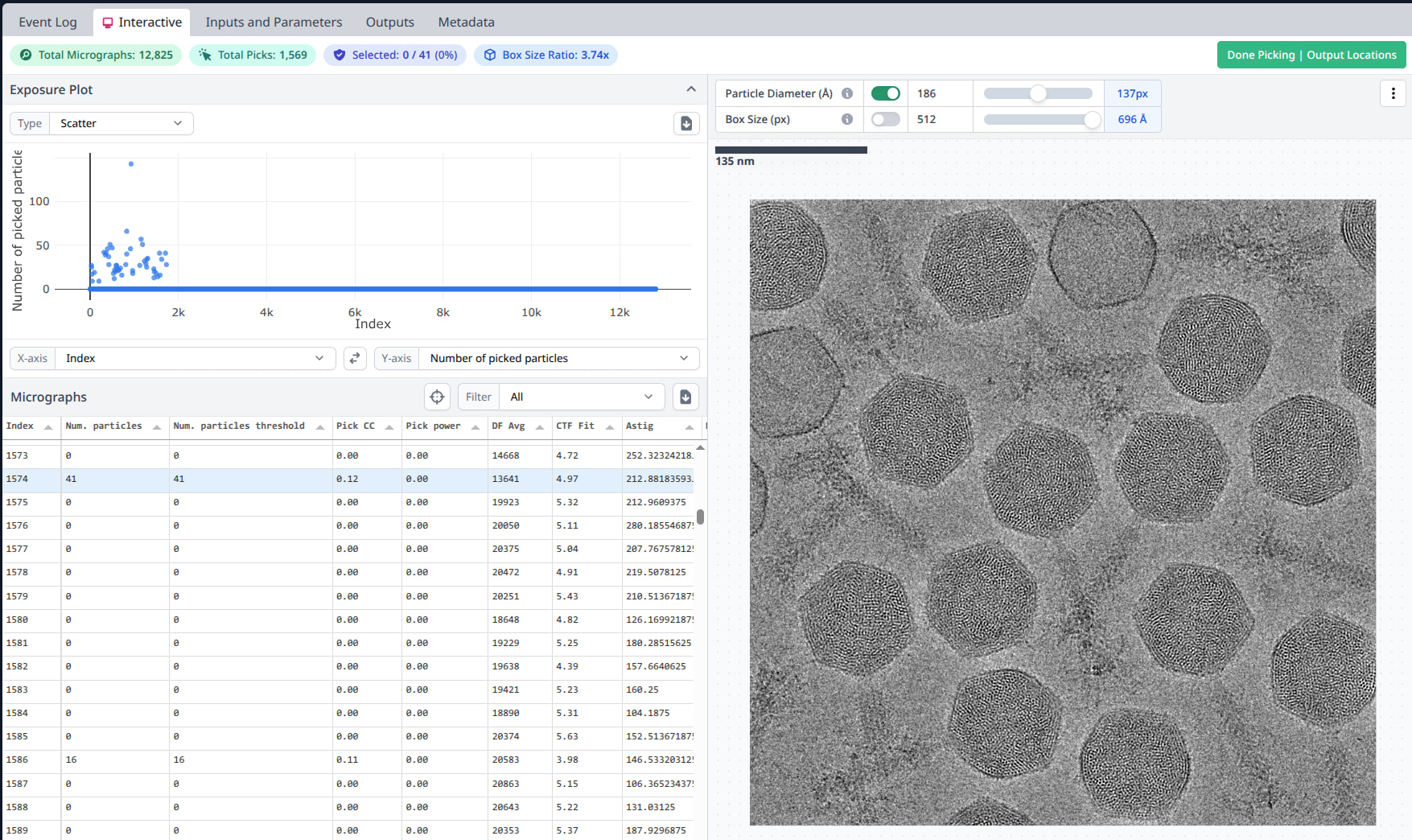
This seems to work fine, the job indicates the correct number of particles have been imported. However, when I run the output through an “Inspect Particle Picks” interactive job, no particles are shown on the micrographs. One of the UI elements reads “Selected: 0/41 (0%)”, in the case of a micrograph that had 41 picks:
Here is the same micrograph with the cbox output in napari boxmanager:
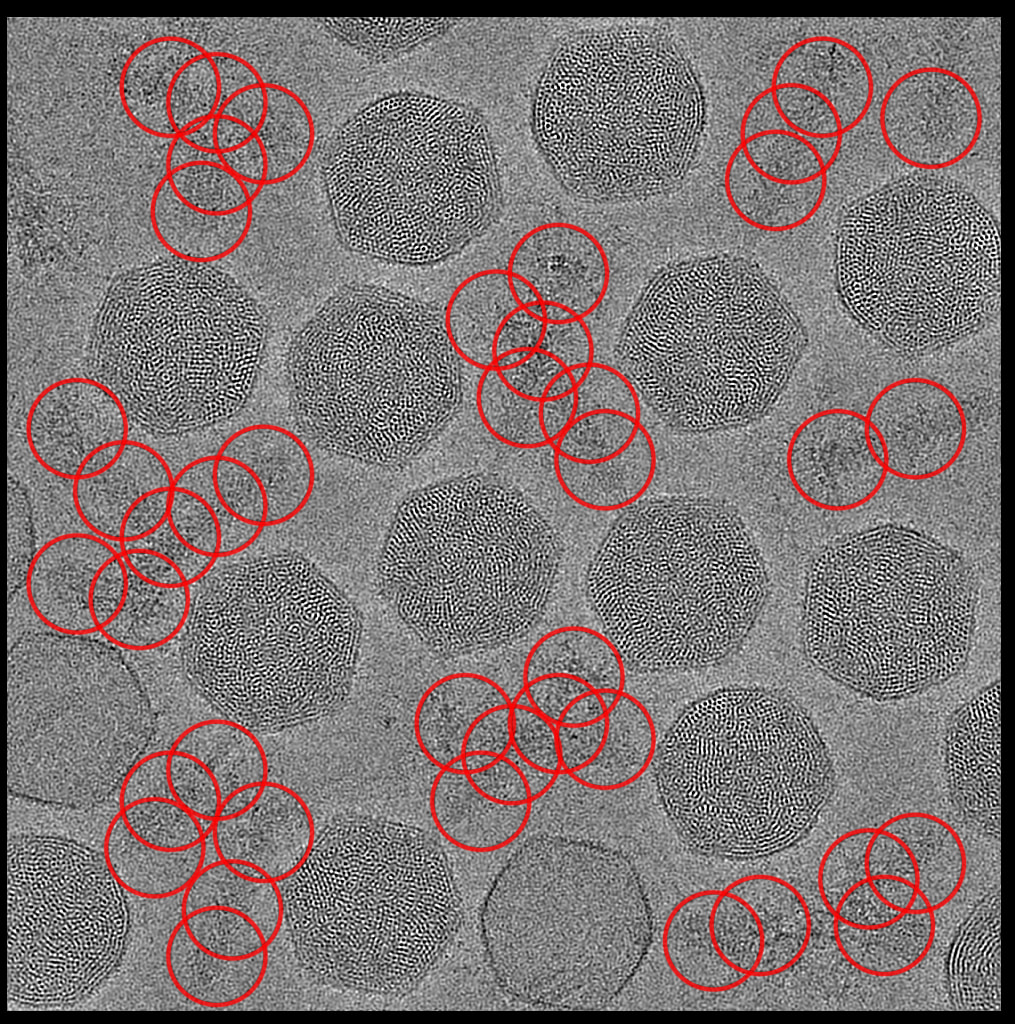
we can see 41 boxes here, so cryosparc is getting the right number of boxes for each picked micrograph, but they don’t show up. If I hit the “Done Picking | Output Locations” button, 0 particles are output. My assumption is the particle locations are being imported wrong so they are all outside the bounds of the micrograph and count as invalid.

Here is a portion of the cryosparc.star file for a particle from the above micrograph:

data_

loop_
_rlnMicrographName #1
_rlnCoordinateX #2
_rlnCoordinateY #3
_rlnAutopickFigureOfMerit #4

000518845170310828016_032826_Blue1_35e_05575_X+1Y-1-5_patch_aligned_doseweighted.mrc 2463.806640625 1823.915771484375 0.11277295649051666

Also, I notice that the “pick power” column in the Inspect Particle Picks table is 0.00 for all micrographs; the _rlnAutopickFigureOfMerit data from the cryosparc.star file is not being used. Comments on this older question indicate the pick power column should be populated by the import job.

I am using cryosparc version 4.7.1-cuda12+251124 and crYOLO 1.9.9

In the import job, I have checked “ignore raw data”,”ignore pose”,”ignore half-set”, and ”output constant ctf”. If I uncheck constant ctf, the import job completes, but the inspect job fails, saying:

AssertionError: No output result match for imported_particles.ctf in job J355

(job 355 is the inspect job)

Pixel size (angstrom) is also set as 1.36

If there is any more information I can provide, please let me know.

EDIT: The imported particles show up correctly in a Manual Picking job

Hi @miwoodso,

I’m sorry for the delayed response! Thanks for inquiring about your issue with inspection of crYOLO picks. There are a handful of items I would like to touch on related to this, with a workaround solution until we can address this in a future version of CryoSPARC.

  1. When importing particles into CryoSPARC from a .star file, the rlnAutopickFigureOfMerit value is transcribed into the pick_stats/ncc_score of the particle dataset within CryoSPARC. Since .star files do not have an analogous power score value, these remain 0. Hence why your particles have an ncc_score but no power score
  2. Inspect particle picks requires both a power and NCC score to display the particle picks since the objective of this job is to filter by these values. This is different from Manually Curate Exposures which does not have such requirements.

To correct for this, you will need to add a power score to the column. The easiest way to do this is to copy the pick_stats/ncc_score into the pick_stats/power column. This is how we handle particles picked using the Topaz wrapper. This can be handled using the cryosparc-tools python package. Below I am including a script. You will need a few things in place to run this:

  1. A working conda environment with cryosparc-tools installed (versioned matched to your instance). This script will work on v4.7 and v5.0.
  2. An instance info file.
  3. Turn the code below into a script with extension .py.
  4. Run in your cryosaprc-tools conda environment using python /path/to/script.py --project "P1" --workspace "W1" --job "J1" --output_to_load "particles" --instance_info "/path/to/instance-info.json"
import argparse
import json
from cryosparc.tools import CryoSPARC


def main():
    parser = argparse.ArgumentParser(
        description="Copy pick_stats/ncc_score to pick_stats/power in a CryoSPARC job"
    )
    parser.add_argument("--project", required=True, help="Project UID (e.g. \"P458\")")
    parser.add_argument("--workspace", required=True, help="Workspace UID (e.g. \"W2\")")
    parser.add_argument("--job", required=True, help="Source job UID (e.g. \"J18\")")
    parser.add_argument("--output_to_load", required=True, help="Output to load (e.g. \"particles\")")
    parser.add_argument("--instance_info", required=True, help="Path to instance info JSON file")
    args = parser.parse_args()

    with open(args.instance_info, 'r') as f:
        instance_info = json.load(f)

    cs = CryoSPARC(**instance_info)
    assert cs.test_connection()

    project = cs.find_project(args.project)
    job = project.find_job(args.job)
    output = job.load_output(args.output_to_load)

    # set power score equal to ncc score
    output['pick_stats/power'] = output['pick_stats/ncc_score']

    out_job = project.create_external_job(
        workspace_uid=args.workspace, title="Copy pick_stats/ncc_score to pick_stats/power"
    )
    out_job.add_input(
        type="particle", name="input_particles", slots=["pick_stats"]
    )
    out_job.connect(
        target_input="input_particles",
        source_job_uid=args.job,
        source_output=args.output_to_load,
    )
    out_job.add_output(
        type="particle",
        name="particles",
        passthrough="input_particles",
        slots=["pick_stats"],
        alloc=output,
    )
    with out_job.run():
        out_job.save_output("particles", output)
        out_job.log("Copied pick_stats/ncc_score to pick_stats/power")

    print(f"Done. Job {out_job.uid} contains particles with 'pick_stats/power' equal to 'pick_stats/ncc_score'")


if __name__ == "__main__":
    main()

Best,
Kye