Cuda drivers mismatch

Hello,

I had to play around with my nvidia driver because i had graphical session craches.
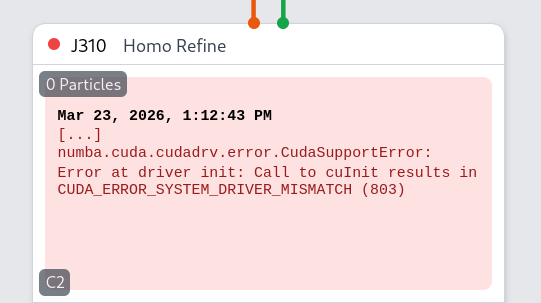
Since then i get this error which is fairly explicit. it seems that in fixing my problem i changed the version of the drivers
however idk how to fix it ?

i can reinstall cryosparc without much trouble if there is no easy fix if i have to.

best regards

Yann Lefrancois

Unless cryosparc_worker/ was somehow modified when you

had to play around with my nvidia driver because i had graphical session craches.

I do not think the problem can be fixed by reinstalling CryoSPARC. May I ask:

  • the CryoSPARC version currently installed
  • the outputs of these commands on the worker:
    nvidia-smi
    uname -a
    cat /etc/*release
    
  • the version and installation method of the previous nvidia driver
  • the installation method of the current nvidia driver
  • whether Linux was rebooted following the latest modifications to the nvidia driver installation

Hello,

cryosparc version is 5.0.2,

Linux hostname 6.1.0-43-amd64 #1 SMP PREEMPT_DYNAMIC Debian 6.1.162-1 (2026-02-08) x86_64 GNU/Linux

PRETTY_NAME=“Debian GNU/Linux 12 (bookworm)”
NAME=“Debian GNU/Linux”
VERSION_ID=“12”
VERSION=“12 (bookworm)”
VERSION_CODENAME=bookworm
ID=debian
HOME_URL=“https://www.debian.org/”
SUPPORT_URL=“https://www.debian.org/support”
BUG_REPORT_URL=“I Challenge Thee

for the previous cuda driver i followed the protocol here but i must say i dont recall which driver specifiicaly was installed all i know is that because it’s cuda 13 the version was >= 580

and selected linux > x86_64 > debian 12 > local

the hyperlinks says cudatoolkit 12.1 but it links to 13.2 which is the correct one

for the current drivers i used the .run file provided by nvidia and i choose the open drivers not the nvidia proprietary one

and yes linux was reboooted following the new driver installation

Thank you for your time

Yann


Your nvidia-smi output show different versions for nvidia-smi and the driver. This could indicate that the most recent driver installation did not replace all components of the older one. This may or may not be a cause for CUDA_ERROR_SYSTEM_DRIVER_MISMATCH.
By the way, CryoSPARC does not require a “system” installation of the CUDA toolkit. An installation of the driver should suffice if you don’t require the toolkit installation for other purposes.

OH,

i had not notice that, i’ll fix it.

thanks a lot

and i do need cuda for other stuff in my work.

best

Yann