Hello,
I looked through documentation and the forum and I am afraid I already know the answer to that but I might as well just ask:
I would like to automate exposure export from live session and starting the data processing for case figures where data acquisition completes in the middle of the night and we want to start data processing sequentially, this can save several hours.
I was looking into rewriting an entire workflow through the API, but that is kind of heavy lifting at the moment and was hoping there was a method to “import” or “translate” a workflow created through the CS GUI into a script.
Any help on this matter appreciated.
Thank you,
Will
1 Like
I couldn’t find a way to easily call a workflow from script so I just started rewriting the jobs in a jupyter notebook for now.
Additional question about scripting: I can’t find the programmatic version of the GUI function New Job > Import Job.
I am trying to import a topaz model that I have in the imports folder of my project:
# Topaz Model

TopazModel_import_job = cs.find_job("P57","J497") # This is the model I am trying to import

# Running Topaz Extract

topaz_extract_job = workspace.create_job(
    "topaz_extract",
    connections={"model": (TopazModel_import_job.uid, "topaz_model"),
                 "micrographs": (curate_exposures_job.uid, "exposures_accepted")},
    params={"exec_path": "/shared/scripts/topaz.sh",
            "par_diam": 130}
)
It is returning an error because I think it just can’t find the model input:
    builder.connect_group(input_group_name  = input_group_name,
  File "/shared/cryosparc/cryosparc_master/cryosparc_compute/jobs/buildcommon.py", line 115, in connect_group
    output_group = com.query(outputjob['output_result_groups'], lambda g: g['name'] == output_group_name, error="No match for %s in job %s" % (output_group_name, outputjob['uid']))
TypeError: 'NoneType' object is not subscriptable
I am going through the documentation to try to find a way to call this outside of project job.
My loose hint is to investigate the “create external job” and related commands, but I’m not sure if this is right.
Thanks,
1 Like
@wjnicol Please can you post the full traceback that ended in
Hello,
---------------------------------------------------------------------------
CommandError                              Traceback (most recent call last)
Cell In[10], line 3
      1 ### TOPAZ EXTRACT ###
----> 3 topaz_extract_job = workspace.create_job(
      4     "topaz_extract",
      5     connections={"model": (TopazModel_import_job.uid, "topaz_model"),
      6                  "micrographs": (curate_exposures_job.uid, "exposures_accepted")},
      7     params={"exec_path": "/shared/scripts/topaz.sh",
      8             "par_diam": 130}
      9 )
     11 topaz_extract_job.queue(lane1GPU)
     12 topaz_extract_job.wait_for_done()

File ~/miniconda3/envs/cs-tools/lib/python3.8/site-packages/cryosparc/workspace.py:99, in Workspace.create_job(self, type, connections, params, title, desc)
     50 def create_job(
     51     self,
     52     type: str,
   (...)
     56     desc: Optional[str] = None,
     57 ) -> Job:
     58     """
     59     Create a new job with the given type. Use the
     60     `CryoSPARC.get_job_sections`_ method to query available job types on
   (...)
...
    builder.connect_group(input_group_name  = input_group_name,
  File "/shared/cryosparc/cryosparc_master/cryosparc_compute/jobs/buildcommon.py", line 115, in connect_group
    output_group = com.query(outputjob['output_result_groups'], lambda g: g['name'] == output_group_name, error="No match for %s in job %s" % (output_group_name, outputjob['uid']))
TypeError: 'NoneType' object is not subscriptable
Thank you!
Hi @wjnicol,
Im sorry for the delated response! Currently, there is no way to execute a workflow created in the Workflow GUI via the API. You might, with proper prompt engineering, be able to have an AI/LLM tool convert a JSON workflow exported from the GUI into a script utilizing our API. We have not tried this, but its not out of the realm of possibilities.
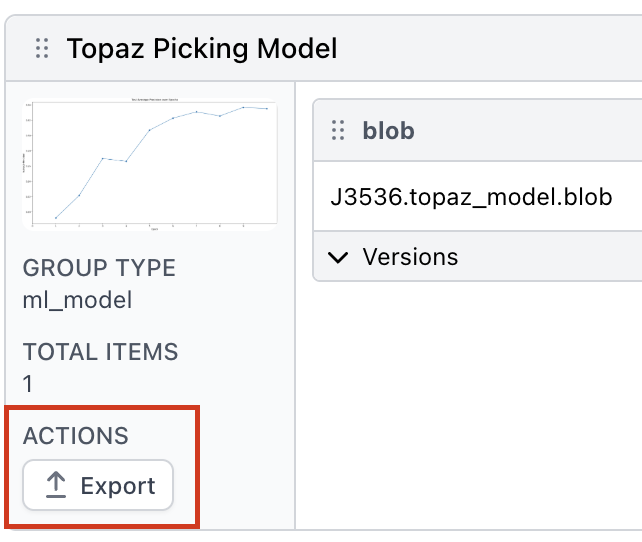
Given your use case of re-using a TOPAZ model likely developed in a different project, the easiest way to achieve this would be to:
-
Export the TOPAZ model from the GUI
-
Copy this export to somewhere on disk that is static and where the folder wont be inadvertently touched or moved
-
Insert a couple lines into your script to copy/symlink this exported result folder to the new projects’ Imports directory
-
Use the job type Import Results Group and providing the .csg file from the newly copied/linked exported results folder.
-
The output of this job (which should include the model) can then be easily piped into the TOPAZ Extract job
Please let me know if you have any further questions!
Cheers,
Kye
1 Like
Hello,
Thanks for your answer.
I have the ln -s part figured out to symlink the absolute path of exported topaz model to the project/imports folder.
However, through the API, I don’t find a way to do “Import Result Group”. Is this just not possible?
Thanks,
1 Like
Never mind I found it!
This displays all the jobs:
job_sections = cs.get_job_sections()
display(job_sections)
Importing result group for model:
# Topaz Model

import_topaz_job = workspace.create_job(
    "import_result_group",
    params={
        "blob_path": TopazCSG[0]
    }
)
Thanks,
1 Like
Hi @wjnicol,
This is correct, please let me know if you have any other questions or run into any other issues.
Best,
Kye
Quick additional question regarding use of API (on this thread). We have been using a script I wrote to start the CS live sessions. It works great except it’s impossible to set the encoding of the images to 16Bits programmaticaly, at least I found no information in the documentation.
Is there a way to do this the same way I set other parameters such as:
cs.rtp.set_param(project_uid=project_uid, session_uid=session_uid, param_sec='mscope_params', param_name='psize_A', value=PxSize)
Thank you very much,
Best,
1 Like
Hi @wjnicol,
You can access these parameters via 'motion_settings': {'output_f16': True} for motion corrected micrographs and 'extraction': {'output_f16': True} for particles output from particle extraction.
eg.
cs.rtp.set_param(project_uid=project_uid, session_uid=session_uid, param_sec='motion_settings', param_name='output_f16', value=True)
Additionally, as you continue to build out your scripts, you may obtain a list of Live session parameters for your currently installed CryoSPARC version by running the command cryosparcm rtpcli "create_and_set_params()"
Please let me know if you have any questions.
Best,
Kye
1 Like
Thank you for the answer and the tip!
Cheers,
1 Like