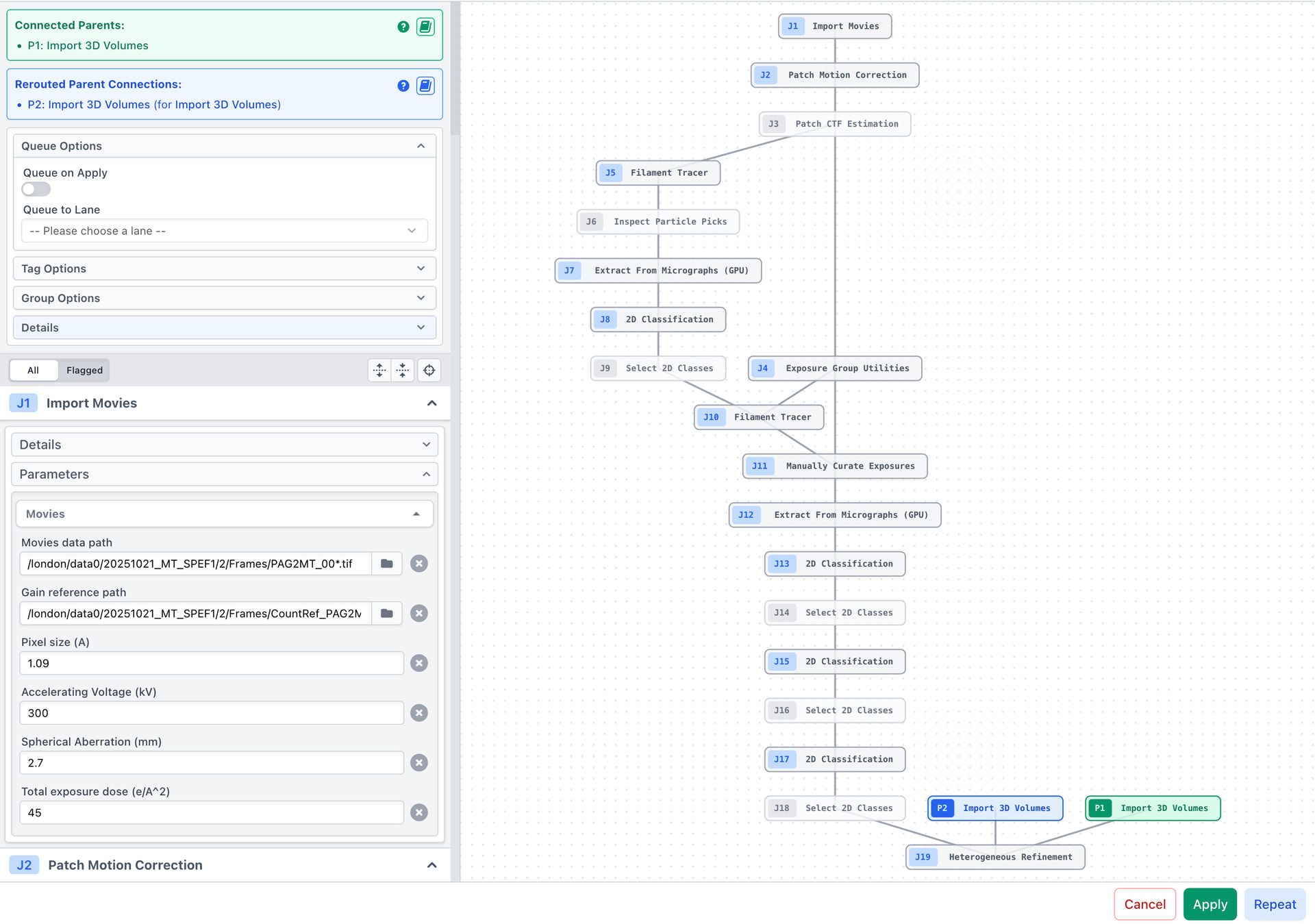
I want to create a workflow. However, in my workflow, I need to import a few existing references and maps. When I created the workflow, it became missing connections. I cannot figure out how to connect this using the Rerouted Missing Connections.
I wonder whether I did anything wrong. The guideline did not clearly show how to do it with several missing connections. Can you help.
Here’s my workflow.
So, currently, I have two reference imports (Import Volume P1 & P2). When I opened the workflow both of them highlight red. Then I clicked on P1 (Import Volume), pressed Cancel and then when to outside select the right Import Volume job, clicked Workflow again. The P1 became “Connected”. But then when I tried to do with P2 (Import Volume), it didn’t work similarly at all.
I have been able to reproduce this behaviour and it looks as though it may be due to selecting too few parent jobs to satisfy the workflow requirements.
In order to satisfy the requirement that the workflow has of 2 Import 3D Volumes jobs as parents, you must exit the workflow and manually select 2 separate Import 3D Volumes jobs. Then you would open the workflow again, and it should have both of these parents correctly connected and shown in green.
I have identified a bug that will allow a single selected Import 3D Volumes job to satisfy both parent requirements, the correct behaviour would be that 1 job would be connected, and 1 would continue to be missing. But the requirement would still be the same.
If it is easier, you could also incorporate the Import 3D Volumes jobs into the workflow by selecting them when creating the workflow. You could then remove the paths while keeping the parameters exposed. This would allow you to keep the workflow self contained with no parents.
Our Automated Workflows guide has an example workflow that incorporates multiple Import 3D Volumes jobs if this is helpful as reference.
I got the things working by selecting everything. Apparently I chose the first and the last job and did “Select job chains”. Doing this way actually misses the Import 3D Volumes (the branches).