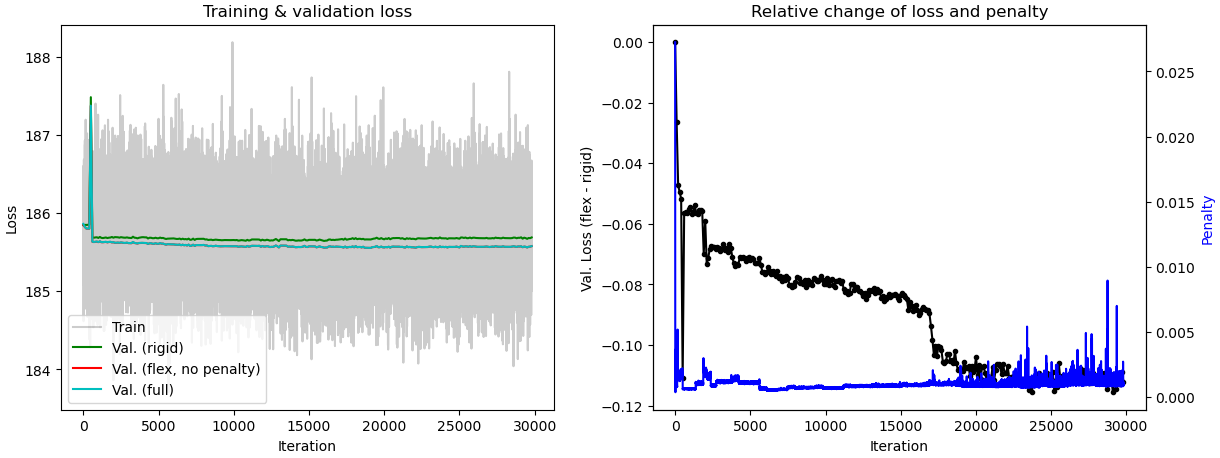
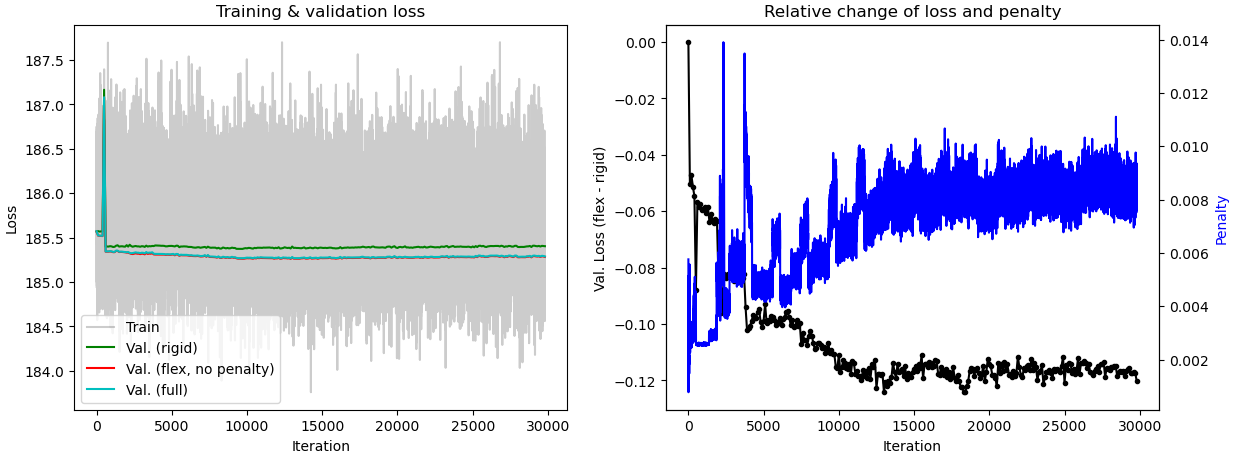
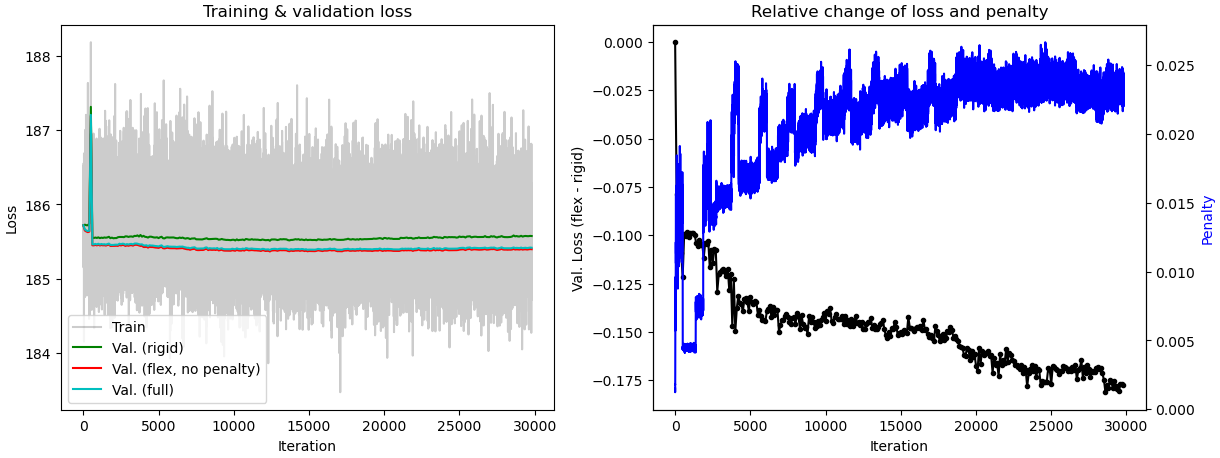
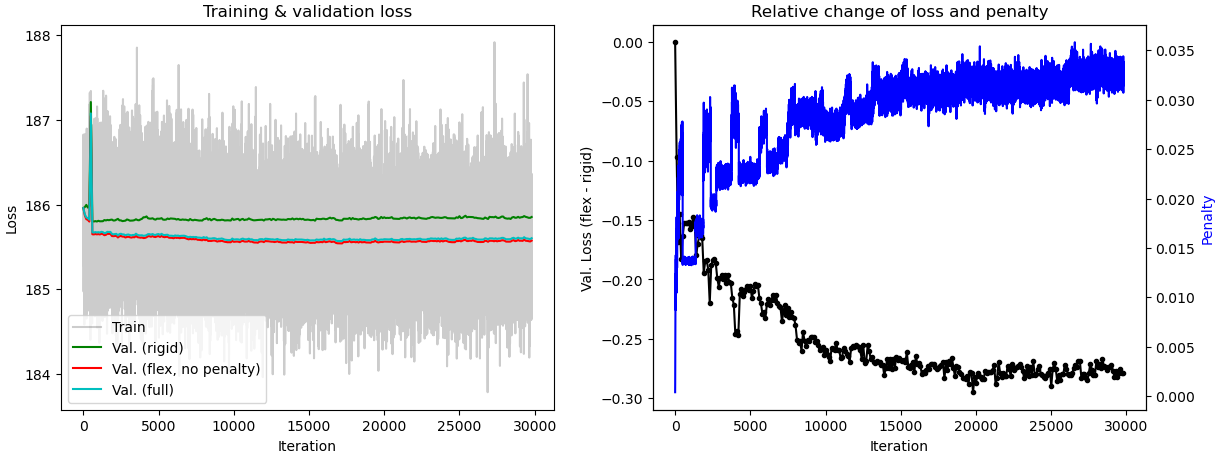
When tuning the rigidity parameter in 3D Flex training, do we expect the component 0 motion in 3D Flex to be similar to component 0 motion in 3D Variability? When I set the rigidity at 0.1, the component 3 motion from 3D Flex is similar to component 0 motion from 3D Variability. However, when I set it at 0.02, component 0 motions from 3D Flex and 3D Variability are similar. The tutorial video on 3D Flex stated that rigidity should be between 20-0.1. On my current dataset, I start to get “healthy/normal” plot of relative change of loss and penalty when the rigidity is set to 0.1 or lower. Should I disregard results I get from rigidity below 0.1? When interpreting the plot, does the numerical value for the penalty matter or is it more or less arbitrary? I am trying to understand how to best interpret the motions relative to the plots.
Additionally, when I run 3D variability and subsequently run 3D Flex with “initialize latents from input”, I get more or less identical motions with different relative change of loss and penalty plot. I am not sure how to interpret the difference in plots.
I’m going to let other answer about the rigidity tunning, but to answer about the motions you observe between the 2 methods, the order is not important but rather what protein motions you can make out of your data. You can say that your protein has certain motions and describe them to explain its function.
In general, you have to tune the rigidity value to your dataset, mesh, and training box size. In my experience, and as you’ve seen here, the default rigidity value of 20 is far too high. The video in the guide is quite old (it’s on our list to update that page!); internally, we have observed rigidity values as low as 0.007 giving good results.
I would worry less about the actual numeric value of the rigidity constant and instead focus on the types of motion you see in your particle. Motions which look “jelly-like” or otherwise not physically realistic might indicate your rigidity value is too low. Typically these unphysical motions will start to appear before training completes, so you can check on a training job with low rigidity while it’s running and kill it early if the rigidity looks too low.
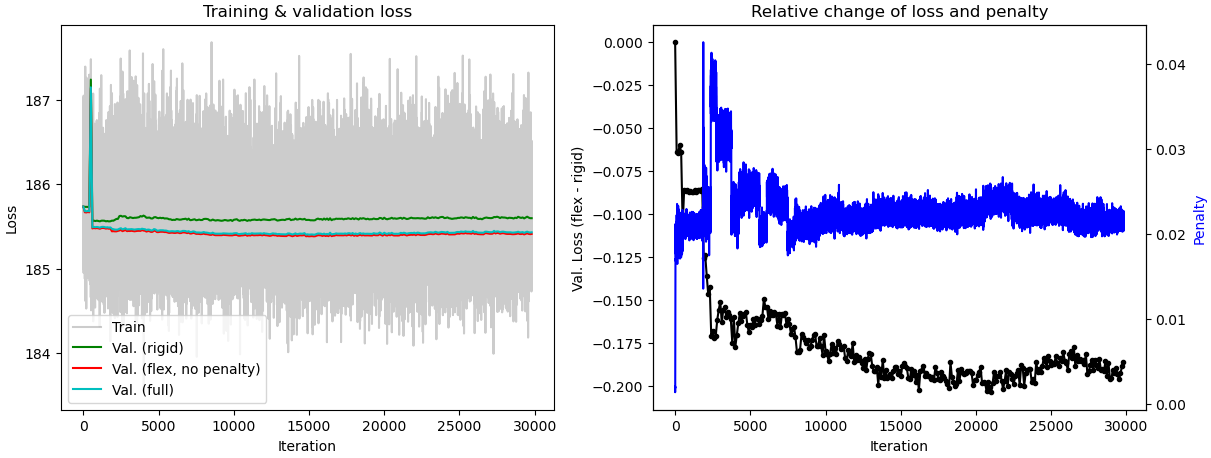
What’s going on in these plots?
In general, I recommend that you don’t pay too much attention to the training plots you posted. The one piece of information that can be useful is making sure that the Val. (rigid) (green line) is higher than the other two Val. lines (red and cyan). If all three are close, it’s another sign your rigidity might be too high. But I still recommend focusing more on:
the distribution of particles in latent space (always reduce the centering strength until particles are spread throughout [-1.5, 1.5] in all dimensions, and
the appearance of volumes produced by 3D Flex Generate
Initialize latents from input
In general, I recommend leaving this setting off. The latent spaces in 3D Flex and 3DVA are fundamentally different, so initializing one from the other is not typically the most useful thing to do. If you’re more interested in how they differ, a recording of a workshop in which I discuss the two is available online. I also discuss the difference a bit in this forum post.
The exception to this is if you see significant motion in 3DVA and want to try to use 3D Flex Reconstruct to recover a better map. In this case, it may be beneficial to have the 3D Flex latent space closely mirror the 3DVA latent space, but in my experience it is still best to train the data “from scratch”.
Thank you for a very detailed response! It cleared a lot of things up! I have a couple of more follow up questions, if you don’t mind. I think I have found the best rigidity and latent centering strength for my dataset. From reading other 3D Flex posts, it seems like achieving a smooth curve in latent distribution is desired. Have I understood that correctly? Also, is it better to have majority of the particle reach (1.5,-1.5) in latent space while having a very small population that extend beyond or to make sure no particle cross (1.5,-1.5)?
I don’t inspect these histograms for smoothness – remember that 3D Flex latent space is not linear, so the difference between a particle at [-1, 1] and [-1, 0] is meaningfully different from the difference between particles at [1, 1] and [1, 0]. This means that compressing latent space along a dimension is not particularly informative about the quality of the underlying training job.
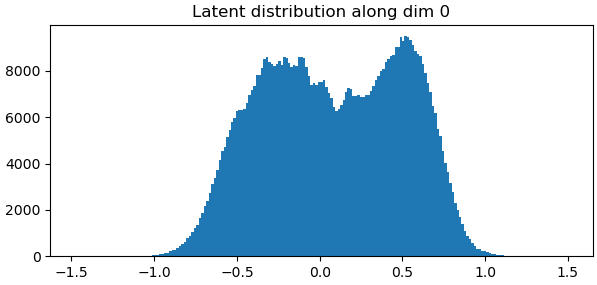
What these histograms do tell us is whether particles are occupying enough of latent space. In the one above, particles are really only going between -1.0 and +1.0, so I would kill this training job and re-run it with a lower latent centering strength.
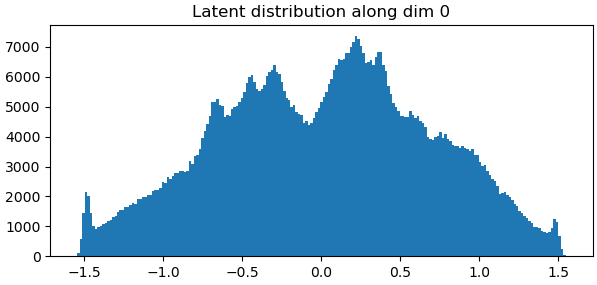
This gets to the second part of your question. Particles are not allowed to extend beyond the range – you’ll see them “pile up” at +/- 1.5 if your centering strength is too low.
In this case, I’d decrease the centering strength a bit. Personally, I’d rather have a very small “pile” at +/- 1.5 than not go all the way to the edges, but I don’t have empirical evidence to support that preference.