edit 4: OK, I’d like to revisit this as string split makes it way too hard to handle. Far too many exposure groups with too few exposures in each. .xml beam shift splitting into fewer discrete groups than by filename, followed by time would be most useful I think. Wish TFS would expose adjusting the BIS range in their UI - it would make life a lot easier in situations like this.
…
Does anyone (paging @rwaldo! ) have a more elegant way of splitting exposure groups by both beam image shift (BIS) and time than a two-pass strategy of [split by time] then [split by BIS]?
I’ve got a nice dataset which I think can go further if I fully optimise exposure grouping to account for CFEG condition (e.g. as Danev et al did with the 200HR atomic resolution work) as well as BIS. I want to break it down into hourly groupings (totally, 20) then by BIS parameters (which will vary as some BIS groups have low populations - so a uniform BIS group number cannot be assumed).
There has to be a neater way than run Exposure Group Utilities 21 times and then re-collecting all the splits together at the end…
If not, I’d like to ask for the “double split” feature to be considered for implementation!
edit: Hm. Just occurred to me - should be possible with latest EPU via string split, rather than .xml, since exposure groups got added to filename. Will test.
edit 2: Yes, that works. Never mind. Just on auto-pilot with .xml BIS splitting and over-thinking the problem. And yes, it results in lots of exposure groups. So will see if it has any impact - whether positive or negative.
edit 3: Wow this is taking a long time. String split looked good… maybe too many particles to reassign. Might be better to sub-divide anyway…
Not sure I am doing it the right way, but I am using the job Exposure Group Utlities, input selection: exposures, action: cluster and split, I manually count the number of clusters from the graph done when importing the files and omit weak appearing clusters from the count, I toggle on “correspond particles to exposures and enforce consistency of exposure group IDs”.
That seems to work for me. It’s fast and easy.
Yes, I’ve been using that for BIS by exposure group since it was introduced. I want to be able to do that and split by a string at the same time (so BIS grouping and temporal grouping) in one job.
If using default shift range with a G3i/G4 and EPU, on R1.2/1.3 grids, it’s basically always 69 optics groups. (7x7+5+5+5+5).
Hi @rwaldo - no, not really. Thought I had a solution via string splitting but .xml based BIS grouping (rather than by filename) along with temporal grouping would provide more flexibility and control.
edit: .xml files also contain time data (sadly, TFS do not expose CFEG flash timing outside of Health Monitor) so should be possible to do it all via .xml parsing.
Hi @rbs_sci, we’ve thought about this a bit more. Do you necessarily want the real clock time the mics were collected, or would using micrograph index as a proxy be acceptable?
Either way, I think cs-tools is your best bet. You could first run Exposure Group Utilities to separate the beam shifts, then split micrographs however you like for time and update the value in ctf/exp_group_id. You might want to start your manually-split groups at e.g. 1000 to avoid trampling on the project’s auto-incrementing exposure group counter.
Real clock time would make it easiest to correlate to CFEG flash timings, as I don’t think CryoSPARC organises in a reproducible way for micrograph index (once imported, index doesn’t change, but is the same dataset always imported in the same order)?
If you wanted to parse datetime out of the XML files, you could do something like this and then set the group id however you like using the information.
import xml.etree.ElementTree as ET
from datetime import datetime
def get_proc_time(mic_path: str | Path) -> tuple[tuple[float, float], float]:
    mic_path = Path(project.dir / mic_path).resolve()
    mic_xml = ET.parse(mic_path.with_suffix(".xml"))
    image_shift = mic_xml.find(".//{*}BeamShift")
    bs_x = float(image_shift.find("{*}_x").text)
    bs_y = float(image_shift.find("{*}_y").text)
    dt = datetime.fromisoformat(
        mic_xml.find(".//{*}acquisitionDateTime").text
    )
    return (bs_x, bs_y), dt.timestamp()

for mic in mics:
    (x, y), ts = get_proc_time(mic["micrograph_blob/path"])
Regarding the micrograph index, in non-Live CryoSPARC, the movies from e.g. Import Movies are always sorted by filename, so provided the filenames start with a datetime or an incrementing prefix they’d be sorted. Live’s imports are not guaranteed to be in any particular order.
 ) have a more elegant way of splitting exposure groups by both beam image shift (BIS) and time than a two-pass strategy of [split by time] then [split by BIS]?
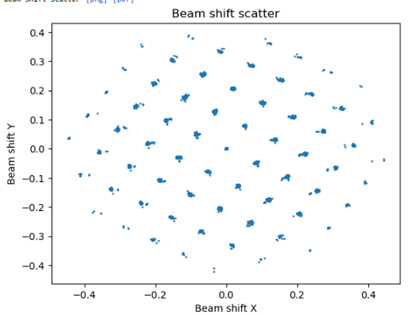
 I want to be able to do that and split by a string at the same time (so BIS grouping and temporal grouping) in one job.