Hi community!
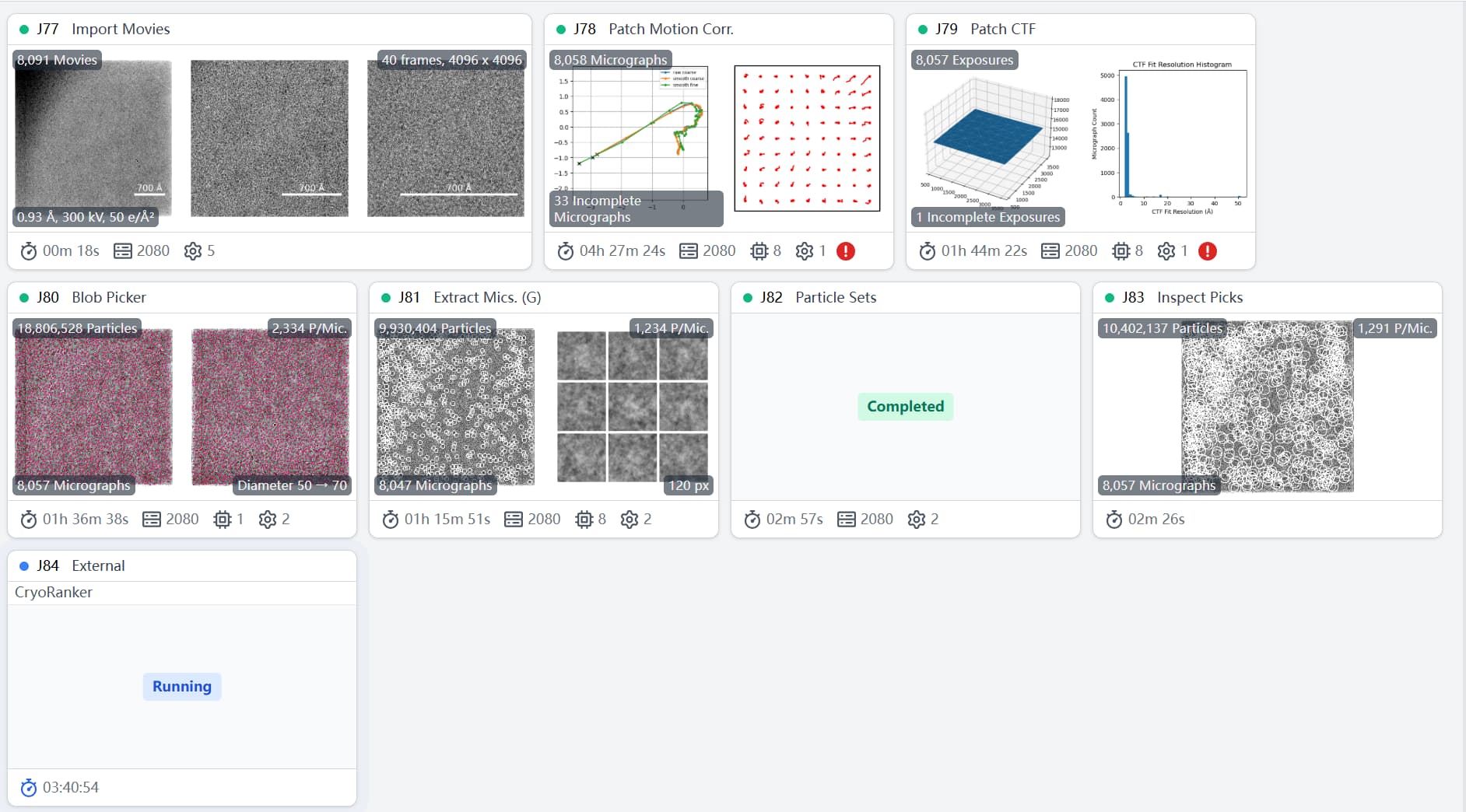
I’m trying to process 1.3 TB of movies in CryoSPARC, and the entire pipeline is expected to use over 3 TB of disk space .
My SSD is nearly full (only ~50 GB left) and the web interface is now extremely sluggish.
Could you please advise on the safest way to delete some upstream jobs (e.g. Patch Motion Correction or CTF estimation) without breaking downstream ones such as 2-D classification, ab-initio or Non-uniform refinement in the below?
You will need to hold onto your Patch Motion Correction output if you wish to perform any kind of particle re-extraction downstream. However, if you have write-access to the filesystem, it may be relatively safe to remove the _patch_aligned.mrc files and retain only the doseweighted-copy. The former is used for CTF estimation but, I believe, has little utility beyond that. Please correct me if I’m wrong.
Patch CTF outputs occupy relatively little disk space. You would need it if you wish to either extract using alternative coordinates or re-extract CTFs based on aligned shifts at some point.
You can offload the moviestacks until such time you wish to run Reference Based Motion Correction though.
Thanks for the reply!
The Blob Picker job found 18.8 M particles; I kept 10 M after running the Inspect Picks job.
Can I safely remove the remaining 8.8 M particles by deleting the Blob Picker job, or will that break the downstream particles I kept?
Picking jobs generate coordinates. These occupy a relatively insignificant amount of space. The details tab in the sidebar will indicate how much space each job is taking up.
It’s the movie-, micrograph-, and particle image-stacks that you might consider focusing on.
If you’ve got more than one project, the easiest way of freeing some space would be detach one not in active use and copy/move it somewhere safe.
I’m a little surprised that 1.3TB of movies is translating into so much used space, though - even with TIFF files, motion corrected micrographs are usually smaller than the input movie.
Also, don’t forget you can have movies on a HDD, rather than an SSD. Once Patch Motion is complete, you won’t need the movies again until (or if) you want to do Reference-based Motion Correction. If you have them in a local directory, move them to an external drive (or mounted network drive) and symlink back to where they used to be, soo CryoSPARC can find them when it needs to.
@leetleyang is right; once Patch CTF is complete, the non-doseweighted (i.e. _patch_aligned.mrc micrographs in the motioncorrected directory) are not necessary any more - I regularly clear them as they take just as much space as the dose-weighed mics, and unless you want to re-run Patch CTF, serve no purpose.
Final thing; from the extracted particles I can see in you screen shot, your box size is far too tight to the particles. Double it. You can Fourier crop the output (I’d suggest 240 pix binned to 80 pix) so while doing initial work the huge stack (a) takes less space, (b) is quicker to process and (c) has a binned Nyquist of around 6 Å (the default filtering level for 2D).
Hi rbs,
Apologies for the delay.
We’re currently managing only one project, but I observed that the store-V2 folder is using approximately 2TB of disk space to store 1.3TB of actual data.
This is notable since the entire project is reported to be 1.6TB in size.
Thanks for the clarification, that makes perfect sense. I’ll focus on the larger stacks and leave the picking jobs alone for now. Really appreciate the guidance!
Looking back at this, I realize I forgot to thank you for the extra advice—you were absolutely right that I had set the box size too tightly.
your spot-on observation saved me a lot of time and headaches. Thank you once again for your generous help!