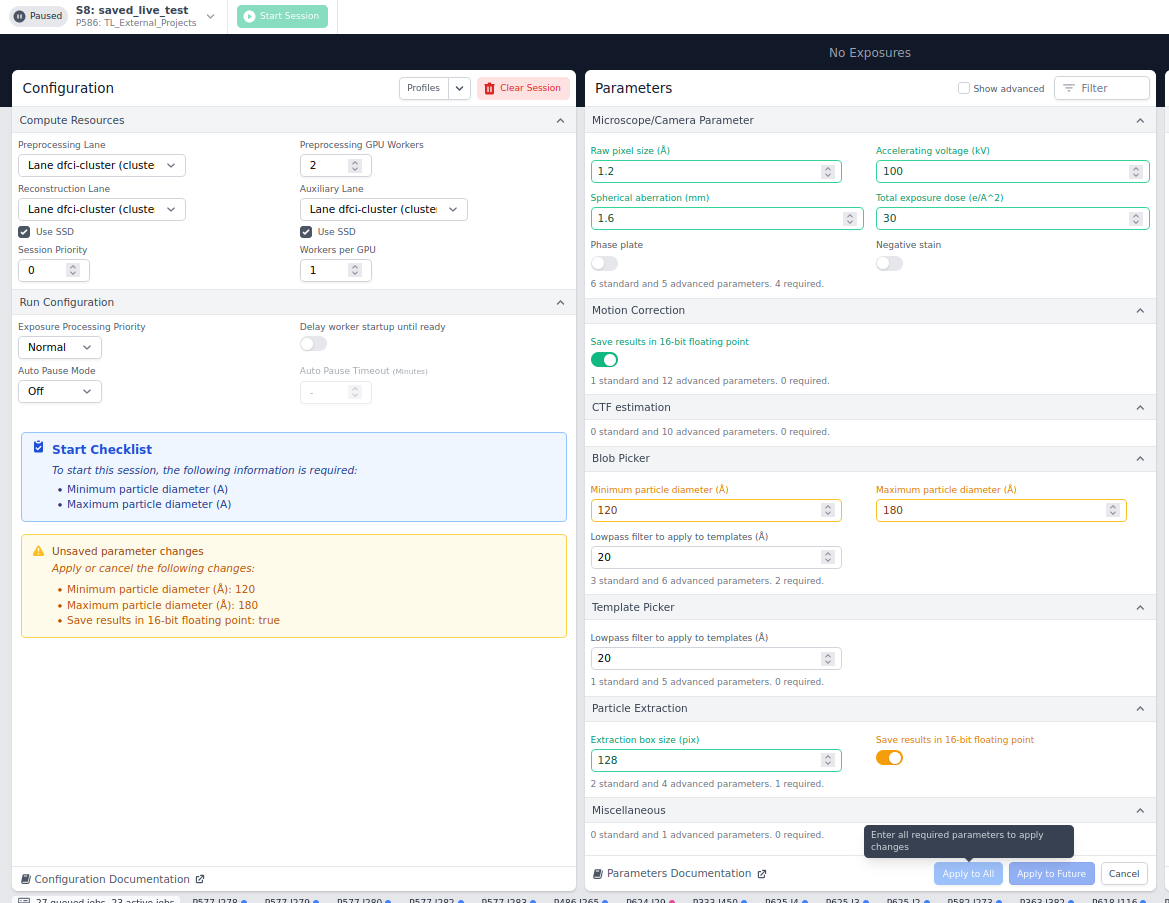
In the update to CS v5 we have noticed a bug where some of our CS Live profiles no longer work. It seems to be if we have a profile saved that doesn’t state particle diameter, then even if you input a particle diameter, the software cannot recognize it. This is independent of browser.
Here is an example where you can see that we have input min and max diameters, but cannot update the session:
Thanks for all your hard work on the latest version! This isn’t affecting our use as I’ll just update the profiles, but just for your knowledge, as it threw us for a loop for a while yesterday.
Related – we were excited about the clone session option, but would be great for those of us that generate a lot of projects to be able to clone session parameters between projects. Our list of saved profiles is quite lengthy and we often have multiple projects with the same live parameters.
Cloning sessions is limited to projects, but I shall pass along suggestions form a colleague that may be useful when the
It is entirely possible that some of these suggestions are already being applied at your site. Session profiles are accessible from within multiple projects.
One may establish and communicate among users a scheme for naming profiles. Names could be derived from the value of a specific setting, like 300kV, and the section, like scope (see below). Such a scheme in conjunction with the Filter capability of the Saved Profiles dialog should facilitate navigating a large collection of profiles.
One may create profiles that define only a subset of the parameter sections. During session configuration, one can combine such profiles by sequentially applying them to the same session.
Thanks, we do utilize these already. Unfortunately we do a new project per collection or couple of collections because we can’t do subfolders within a project and often have multiple workspaces per collection, so the cloning session utility is very limited. Perhaps this is nonstandard.
Just responding to make sure the actual bug reported here is still being worked on – if the subset of parameters in a profile does not include particle min and max sizes, they cannot be updated in a way that the program recognizes. The fields can be updated but it cannot be saved as they are still flagged as missing.
For this issue, please can you send us the outputs.txt.gz file created by these commands (replacing P99, S9 with the project and session IDs of an affected Live session)
cd $(mktemp -d)
pwd # record path for file retrieval and deletion later
# replace P99, S9 with actual project and session IDs
cryosparcm cli "api.sessions.find_one('P99', 'S9')" > outputs.txt
cryosparcm cli "api.sessions.get_configuration_profiles()" >> outputs.txt
gzip outputs.txt
After retrieving outputs.txt.gz, you may remove the directory that was created with the first, mktemp -d, command.
Also, please let us know the name of the profile that you were trying to apply.
@tlevitz thanks for sending this info over. We’ve determined the issue and will work on a fix! In the meantime, if you’re able to create a configuration profile with all required parameters, you should be able to apply them as expected.