I am encountering an error when trying to launch interactive jobs - all other jobs work fine - when using v5.0.6
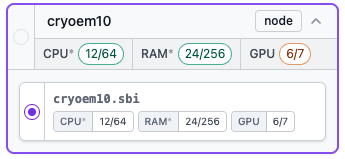
I can build the jobs without issues but when I click on queue job, I cannot see any lane / GPUs to select and if I still click on queue to master node, I see this error message :
Cannot specify lane or hostname to queue interactive Job P1-J9 (Manually Curate Exposures)
Refreshing the browser or cryosparcm restart have not solved the issue.
It is expected that one cannot select a lane for an interactive job, as interactive jobs are designed to run on the CryoSPARC master.
The error message Cannot specify lane or hostname to queue interactive Job is not expected when Queue to master node has been pushed.
Please can you let us know:
Did the error occur when the the workspace was in card, tree or table view?
Was this job created and built manually, or created by an Extensive Validation job, or cloned from another job?
Is your CryoSPARC installation of type “single workstation”, “master-worker” or “cluster”?
Can the Manually Curate Exposures job be run after a restart of CryoSPARC? If the queuing error persists after the CryoSPARC restart, please
take a screenshot of the CryoSPARC UI
create and preserve a snaplogstgz file with the cryosparcm snaplogs command.
We may ask you to send these items to us if the problem persists.
The error occurred when the workspace was in card view. I’ve just tried tree view and got the same issue. But using table view and queuing the job via “action” and then “queue job” did work! (rather than directly pressing queue job).
For future readers of this post, my answer to your other questions in case that makes a difference:
the job was created and built manually
This installation if a single workstation type
The Manually Curate Exposures job could not be run after a restart of cryosparc when trying to run it using the workspace card view and directly pressing the queue job button
Do you still want me to send the snaplogs? Everything seems to be working ok by starting from the table view.
Thanks @anais1 for the additional information.
We are investigating a potential path of events that may lead to the error.
Do you recall whether, when queuing your most recent non-interactive job, you specifically selected the “inner” radio button that represents the target node inside the lane, instead of the lane as a whole?
I am not sure how this was for previous jobs but I have just started 2 new jobs, one directly from the job builder and the other using ‘quick actions’ and both times the lane as a whole was already pre-selected when queuing - which I haven’t changed - and the jobs ran fine.
Hi @anais1, we believe that the issue is a bug in the pre-selection logic in the queue job form - causing a node other than the master node to be selected in interactive jobs (which is not allowed). A fix for that will be available in a future release.
In the meantime, you can queue interactive jobs via the actions panel (which should work in any view) or quick-access/context menu as a workaround if needed.