Hi CS folks,
A feature request for something that arises somewhat regularly – when selecting thresholds in the Overview tab of CS Live, the minimum value is auto-set to the current minimum of the data set for each category (Timestamp, Defocus Avg, etc). Most of the time, we care about setting maxima and not minima (for example, just getting rid of things with max in-frame motion over a certain amount). However, users semi-regularly accidentally set a minimum value early on in the data collection while trying to set a maximum only, and then better micrographs come in and get rejected because of the minimum that was set.
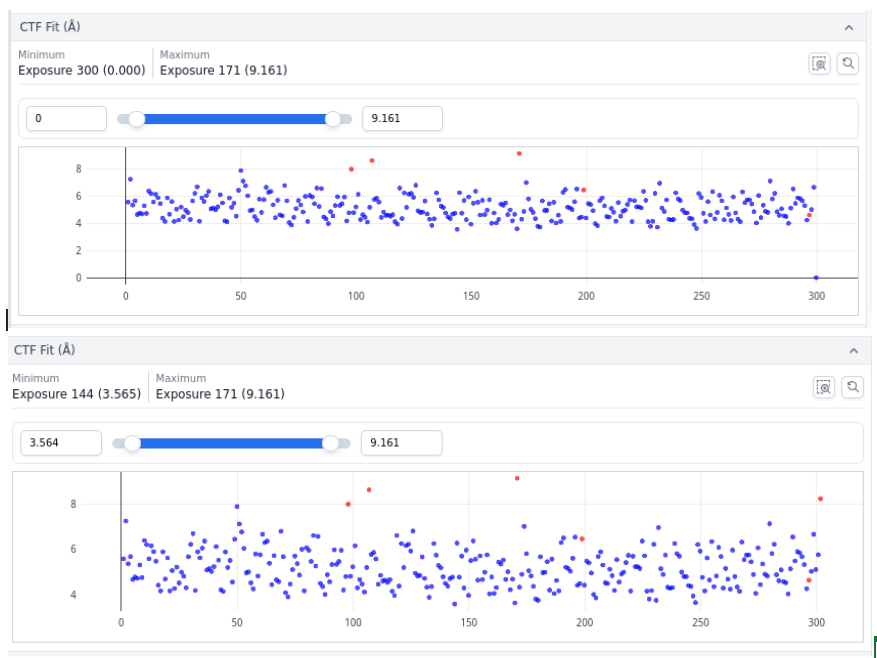
This is complicated by the fact that currently-processing micrographs are set to zero while they are processing, so depending on the exact moment at which the user sets the limits, they may have a limit of zero (likely the desired behavior) or the current minimum. I mostly notice this causing issues with users setting maximum threshold values for CTF Fit, Max In-Frame Motion, and Total Motion (occasionally also Defocus Range), all of which could probably be set to auto-minimum at 0 as opposed to the data minimum without too much disaster?
Curious on others’ experiences with this as well and if there is something obvious we should be doing to avoid.
Oh thank you, I will respond on that thread, would love to see it implemented in Live (previous response was from me not reading the other thread carefully enough)
Hi @tlevitz, could you further explain how users are accidentally setting a minimum value? There are a few ways to set it:
- Visually by click + dragging on the plot which will snap the bounds of the threshold to the minimum and maximum value of the exposures that are within the region you dragged across.
- Moving either the minimum or maximum knobs of the threshold slider.
- Manually inputting a value in the number inputs adjacent to the threshold slider.
If the intention is to only set an upper bound, you can always use 1-3 to set the upper limit and then manually set the lower limit to 0. Please let us know if that manual workaround is not viable for some reason.
– Ryan
Hi @rnarine,
#2 or #3 is primarily what is happening to our users when they set a maximum value. Yes, the workaround is to manually set the lower limit to 0 and that is possible with our seupt. However, of course no matter how much I warn that the lower limit is not “smart” enough to adjust itself to the data minimum when a new minimum happens, users still end up cutting off good data inadvertently.
For example:
-A user in CS Live looks at the first 50 micrographs, where the minimum CTF value is 2.5 and the maximum CTF value is 20. They want to get rid of all the high-CTF values, so they go in to the number inputs and set a maximum threshold of 6A and blissfully walk away for the evening. On the graph, it appears that the minimum is approximately 0 because of the scaling, so they don’t think about it.
-Then, as micrographs 51 - 10,000 come in to the Live session, multiple micrographs come in that are better than the first 50 and have CTF values between 2 and 2.5. All of these micrographs are rejected, but especially if the user has other thresholds set as well, and depending on the scaling of the scatterplot, it isn’t clear that those ones are being rejected because of CTF (relatedly, I would LOVE if a future version lets you hover over a micrograph and it tells you why it was rejected – I can make that a separate feature request at some point for that!). The user accidentally rejects all of their 2 > 2.5 A CTF fit micrographs and those can’t contribute to their final reconstruction.
This is a sort of extreme example, but similar things have happened multiple times to our users, particularly novices. It would be great if CS were “smart” enough to auto-update the minimum to be the data minimum unless the minimum is changed (same with the maximum I guess if just a minimum is set?). Thinking about how this works on the back end I realize this isn’t trivial, so auto-setting some of them to a minimum of zero makes sense.
This is especially true because right now the minimum is set to zero a lot of the time – it is zero any time there are micrographs that are processing in Live and the processing micrographs are assigned zero until they are fully processed and have a value for all the parameters. Thus, it is even harder to warn users about it, because more than half the time they click on “set threshold”, zero actually will be the minimum. I always sort of felt like those ones should be excluded entirely from the minimum / maximum determination, but I think it wouldn’t really matter if the minimum determination were more dynamic (or were just always zero for some parameters). I attached two screenshots from moments apart from a currently running Live session to show what I mean.
Let me know if that makes sense or if you have more questions about the workflow!
1 Like
Thank you @tlevitz for explaining the workflow so thoroughly!
it is zero any time there are micrographs that are processing in Live
This is not intentional and appears to be a bug. A fix will be made in an upcoming release.
It would be great if CS were “smart” enough to auto-update the minimum to be the data minimum unless the minimum is changed
As CryoEM2 mentioned before, we have recorded this feature request, however the solution we are leaning towards is allowing the user to individually set a maximum or minimum threshold rather than always having to set both.
I would LOVE if a future version lets you hover over a micrograph and it tells you why it was rejected
We have also recorded this feature request before but I made a note that it has been requested again.
I hope that addresses your concerns/suggestions. Thanks again for your insight!
2 Likes